Resource
🔶 11 Jobs I'd Give Claude in Marketing Ops
8/25/2026
The Marketing Operations & Revenue Operations Professional's Guide to Claude: Volume 2
Most of my first Claude guide started after I already knew I needed help. 🫠
Clean this dataset, work through this routing logic, write this SOQL, document this build.
I mean, I still use Claude that way constantly. 🤷♀️
But some of the Ops problems that waste the most time start before you know there is a problem. They are preventable.
So I started thinking about the jobs I could give Claude around an Ops function -- noticing, investigating, preparing, or checking things before I would normally get involved.
These are 11 jobs I'd start with.
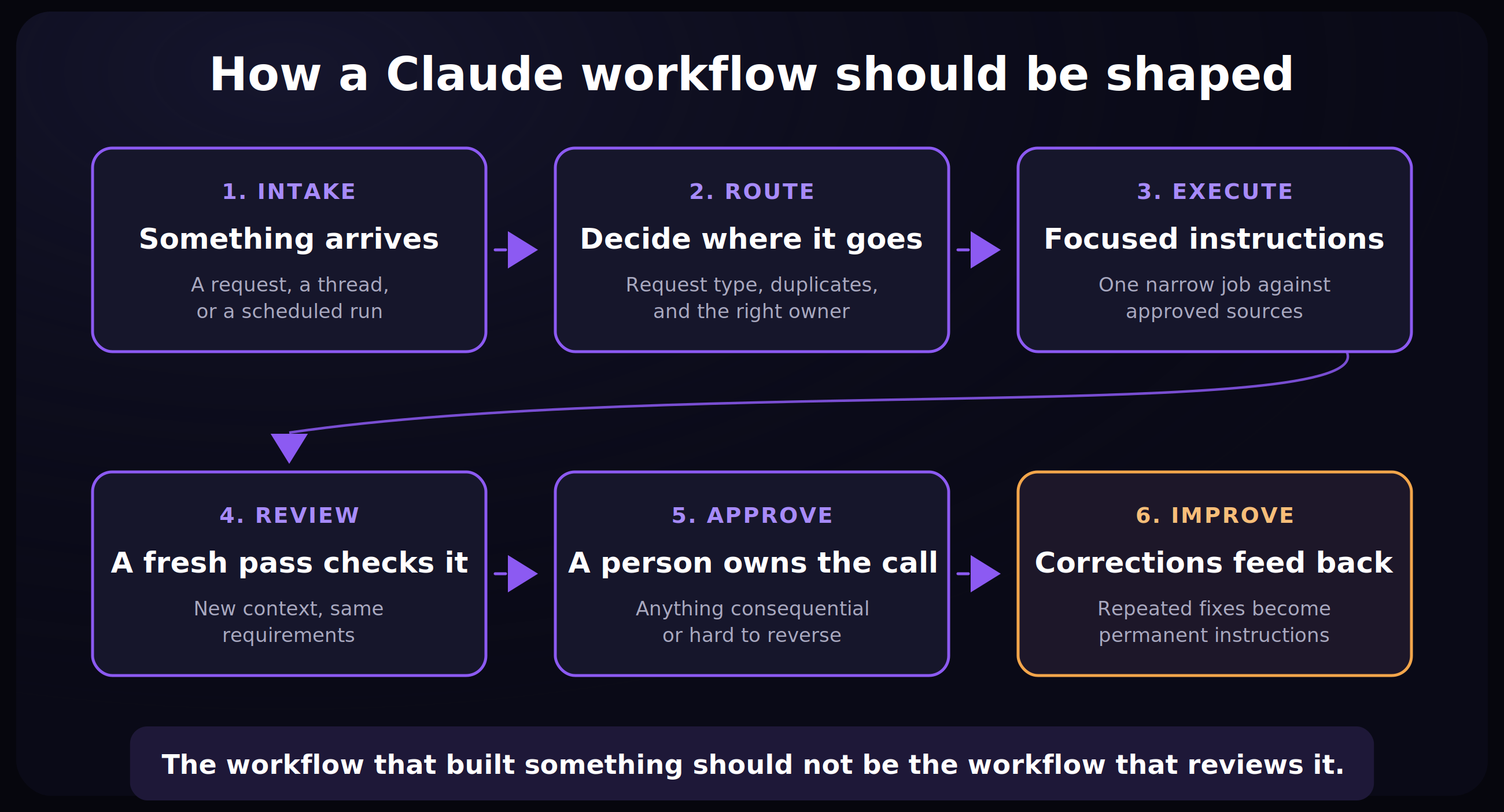
Pick the problem you keep having
If this keeps happening... | Start here |
Ops finds out about work too late | 1. Catch Ops work earlier |
Requests arrive incomplete or go to the wrong place | 2. Triage incoming work |
GTM plans have holes nobody finds until implementation | 3. Pressure-test a GTM plan |
Small changes cause surprise breakage | 4. Map the blast radius |
UAT never gets written properly before go-live | 5. Draft and run UAT |
Manual workarounds keep multiplying | 6. Find unofficial processes |
Good opportunities disappear between handoffs | 7. Find GTM process leaks |
You open a dashboard every morning to see whether anything needs you | 8. Daily HubSpot data brief |
One project is scattered across too many channels | 9. Daily project brief across Slack |
Forecast problems surface during the review instead of before it | 10. Check the forecast |
You hear about a broken sync from somebody downstream | 11. Watch integrations |
Before you start
For each job, define four things:
Define | Question |
Scope | What approved context can Claude use? |
Responsibility | What specific thing should it look for? |
Output | What should it give you back? |
Authority | What still requires a person? |
My default boundary: Claude can investigate, compare, prepare, and recommend.
I would keep system changes, approvals, customer communication, ownership changes, and anything difficult to reverse behind human review.
And I would start manually.
Don't automate a process that still produces unreliable results by hand. 🫵
1. Catch Ops work earlier and make it easier to manage
Use this when: Work gets created in Slack or meetings before anyone formally involves Ops.
Ask Claude to: Scan the approved channels for conversations that may create Ops work, pull together the surrounding context, and open a ticket with links, stakeholders, dependencies, and open questions.
Have it return: A draft ticket you can accept, edit, or throw away.
Example
ㅤ | ㅤ |
Discussion | Automating Tier 2 follow-up |
Status | Approval unclear |
Possible impact | CRM, enrichment, sequencing, reporting |
Stakeholders | Named from the thread, with the message linked |
Missing | Audience, exceptions, owner, success metric |
Next step | Clarify before implementation |
Don’t get it confused: Claude doesn't decide that something is an approved project.
It captures the context into a ticket while the conversation is still fresh, so you are editing a draft instead of reconstructing a thread three weeks later. Awareness helps spark conversation too.
Btw, some things might get picked up that don’t end up being decisions — that’s fine too, IME it helps to know folks are thinking about it and it can always be scrapped or ignored.
Starter instructions
2. Triage incoming work
Use this when: Your intake queue contains incomplete, duplicate, or misrouted requests.
Ask Claude to: Identify the request type, check required information, find related work, and determine which documented process or owner handles it.
Have it return: READY or NEEDS CLARIFICATION, plus whatever is missing.
This is similar to a pattern Anthropic described in its own Marketing Ops setup recently: incoming campaign requests can be routed to focused workflows instead of asking one process to handle every possible request.
Starter instructions
3. Pressure-test a GTM plan before you build it
Use this when: Someone brings Ops an ABM motion, lifecycle redesign, outbound workflow, AI-supported process, or other cross-functional plan.
Ask Claude to: Look for missing data, unsupported assumptions, ownership gaps, edge cases, and architecture problems before anyone builds it.
Classify the findings
Classification | Meaning |
BLOCKER | Resolve before implementation |
HIGH RISK | Requires an explicit decision |
DESIGN QUESTION | The plan needs more definition |
ACCEPTABLE TRADEOFF | Risk appears understood |
Important pro tip: Claude likes to jump to creating things, so be sure to tell it to just give feedback — we want the critique first. ✋
Starter instructions
4. Map the blast radius of a change
Use this when: A field, definition, routing rule, lifecycle stage, scoring condition, or other shared logic is changing.
Changing Enterprise from 1,000 employees to 2,000 sounds small.
Where does 1,000 live?
Routing, scoring, audiences, territory rules, dashboards, reports, enrichment logic, outbound automation, and documentation are all possible dependencies.
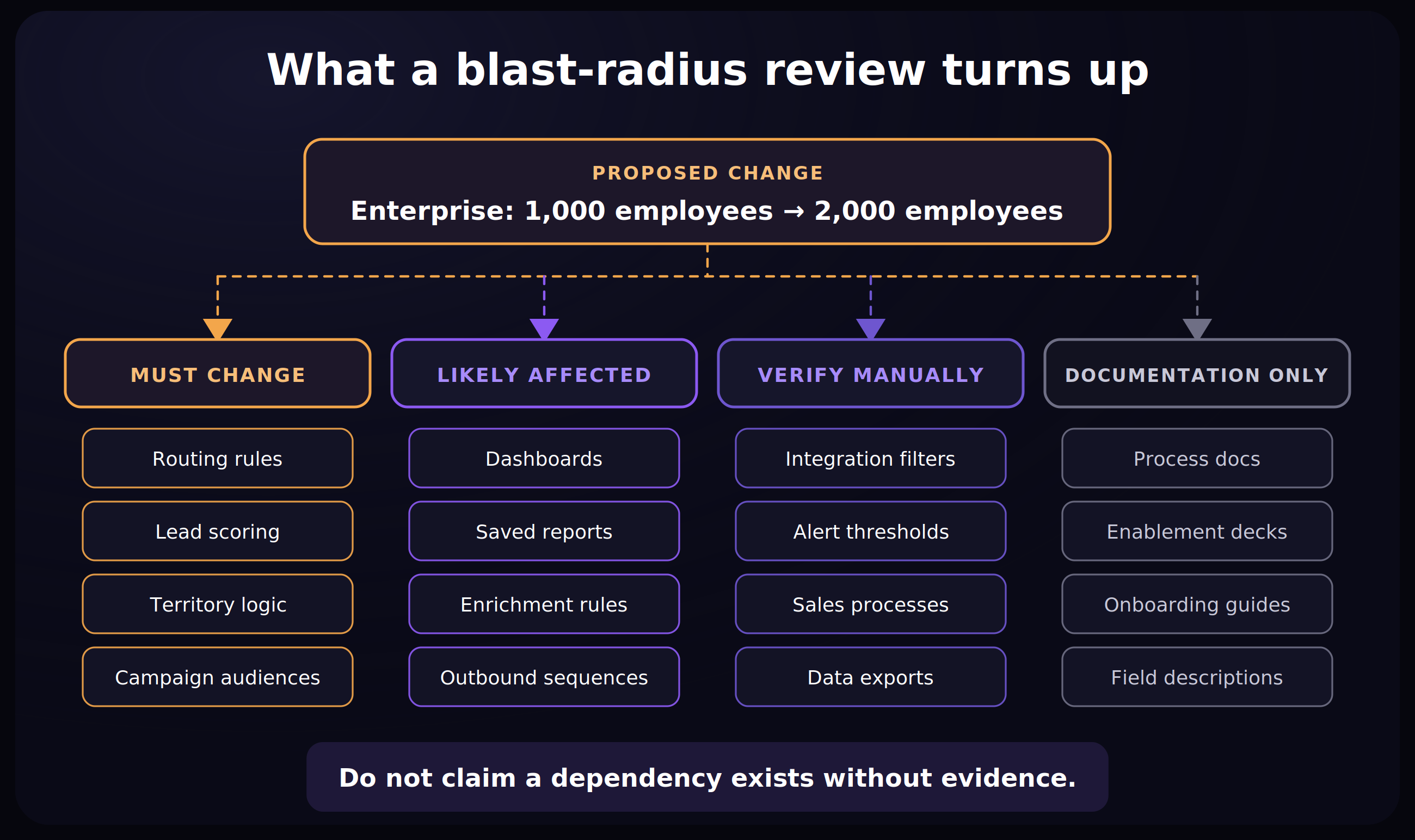
Ask Claude to: Search your approved systems context and documentation for everything downstream that may be affected.
Have it classify each one
Category | Meaning |
MUST CHANGE | Direct dependency |
LIKELY AFFECTED | Strong evidence -- verify |
VERIFY MANUALLY | Possible relationship |
DOCUMENTATION ONLY | Written docs need an update |
Then ask for a regression-testing checklist.
Starter instructions
5. Draft and run UAT
Use this when: A build is finished and needs UAT, and writing the test sheet is the part that…well, candidly, that nobody wants to do.
Ask Claude to: Turn the approved requirements into a v1 UAT sheet. You adjust the test cases, then Claude executes the ones it can safely perform and documents the results. Works like a charm.
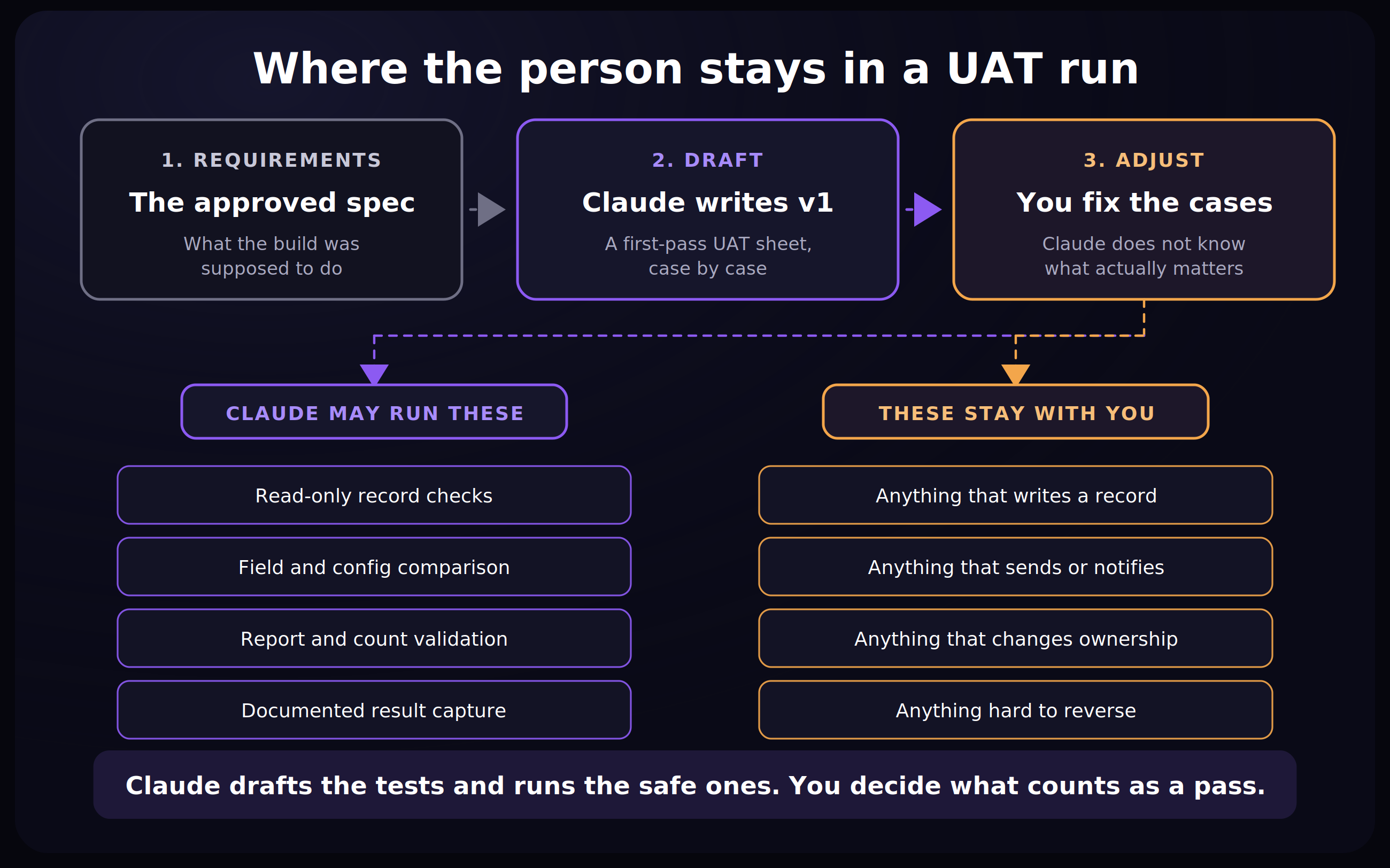
The v1 sheet is a starting point, not a finished artifact. Claude does not know which edge cases actually matter in your business, and that judgment is the part worth your time.
I especially want it flagging:
REQUIREMENT MISSING: Nobody defined what should happen here.
That can be more useful than PASS or FAIL.
Starter instructions
6. Find unofficial processes and manual workarounds
Use this when: Temporary spreadsheets, exports, manual reconciliation, personal workflows, and undocumented exceptions start becoming normal operations.
Ask Claude to: Look across Slack, tickets, docs, spreadsheets, and recurring work for manual exports, reconciliation, shadow processes, and other workarounds that have become part of how the company operates.
Have it classify them
Classification | Meaning |
KEEP | It serves a legitimate purpose |
FORMALIZE | It needs ownership or documentation |
REPLACE | Evidence supports moving it into the approved process |
INVESTIGATE | You need to understand why it exists first |
Unofficial does not automatically mean wrong.
Sometimes the workaround is telling you something important about the process it bypasses.
Starter instructions
7. Find GTM process leaks
Use this when: Qualified people or accounts may be falling between routing, ownership, follow-up, campaign handoffs, opportunity coverage, or expansion processes.
Ask Claude to: Look for source-supported process problems around commercially interesting records.
That could include missing follow-up, broken routing, fragmented account coverage, reactivated closed-lost accounts, stalled opportunities with renewed activity, campaign handoff problems, expansion signals, qualified records excluded by logic, bad-data patterns, or repeated funnel stalls.
Example
Finding | Classification |
Demo request has no owner after 36 hours | REVIEW |
Account repeatedly routes to inactive owner | ACT NOW |
Segment converts poorly with no process issue found | PERFORMANCE QUESTION |
Closed-lost account has renewed activity | WATCH |
A disappointing outcome alone is not a process leak.
Starter instructions
8. Give me a daily HubSpot data brief
Use this when: You open a dashboard every morning to manually work out whether anything needs attention.
Ask Claude to: Review HubSpot each morning and summarize the things you'd want to know before opening a dashboard yourself.
Have it return: Meaningful changes, suspicious data patterns, records that need attention, and areas worth investigating.
Section | What comes back |
Changes | Movement since the last brief, with the comparison period |
Data patterns | Duplicates, missing owners, stalled stages, unexpected volume |
Needs attention | Specific records, with links |
Worth a look | Open questions, kept separate from confirmed findings |
Starter instructions
9. Give me a daily project brief across Slack
Use this when: A project has conversations happening across a ridiculous number of channels. Think: M&A, migrations, new product launches.
Ask Claude to: Scan the approved channels connected to one major project and summarize what changed.
Have it return: Decisions that were made, new risks or dependencies, and anything that needs your attention.
Section | What comes back |
Changed | What moved since the last brief |
Decided | Decisions, with the message linked |
New risk | Blockers and dependencies that appeared |
Needs you | Items waiting on you specifically |
Unanswered | Questions nobody picked up |
The distinction that matters most here is between a decision and a discussion. Getting that wrong is how a brainstorm turns into an assumed requirement.
Starter instructions
10. Check the forecast for things that look wrong
Use this when: Forecast problems surface during the leadership review instead of before it.
Ask Claude to: Inspect the forecast and the underlying pipeline for inconsistencies, unusual movement, missing information, or deals that deserve a closer look.
Flag | Meaning |
ASK BEFORE REVIEW | Raise it before leadership does |
WATCH | Not wrong yet, but moving oddly |
MISSING INFORMATION | Cannot be assessed as recorded |
LIKELY FINE | Explained by recorded activity |
Starter instructions
11. Watch integrations for problems
Use this when: You find out an integration broke because somebody downstream noticed.
Ask Claude to: Regularly check the integrations and syncs you care about for errors, unexpected behavior, stale data, or other warning signs. This can be especially helpful with Claude Cowork using Chrome.
Have it return: A concise list of what needs investigation.
Signal | What it usually means |
Sync errors | Something broke and said so |
Records that stopped updating | Something broke and said nothing |
Empty or default values | A field mapping broke |
Volume outside the normal range | A filter or trigger changed |
Starter instructions
Five rules I'd use across all of these
1. Require evidence
For every finding, cite the source material supporting it.
2. Separate observations from hypotheses
Clearly distinguish what the evidence shows from what might explain it.
3. Let Claude find nothing
If the evidence does not support a finding, do not manufacture one.
4. Preserve source IDs and links
Keep record IDs, ticket IDs, opportunity IDs, campaign IDs, workflow names, report names, and source links whenever possible.
5. Define what Claude cannot do
Be explicit about system changes, customer communication, ownership changes, launches, approvals, destructive actions, and anything else that should remain with a person.
How I'd start
Stage | What changes |
Manual | You supply the context and run it yourself |
Standardized | Inputs, output, definitions, and review rules stabilize |
Connected | Claude retrieves approved context |
Recurring | A stable process runs from a schedule or defined trigger |
Four of these eleven are written as recurring jobs. That is the end state, not the starting point.
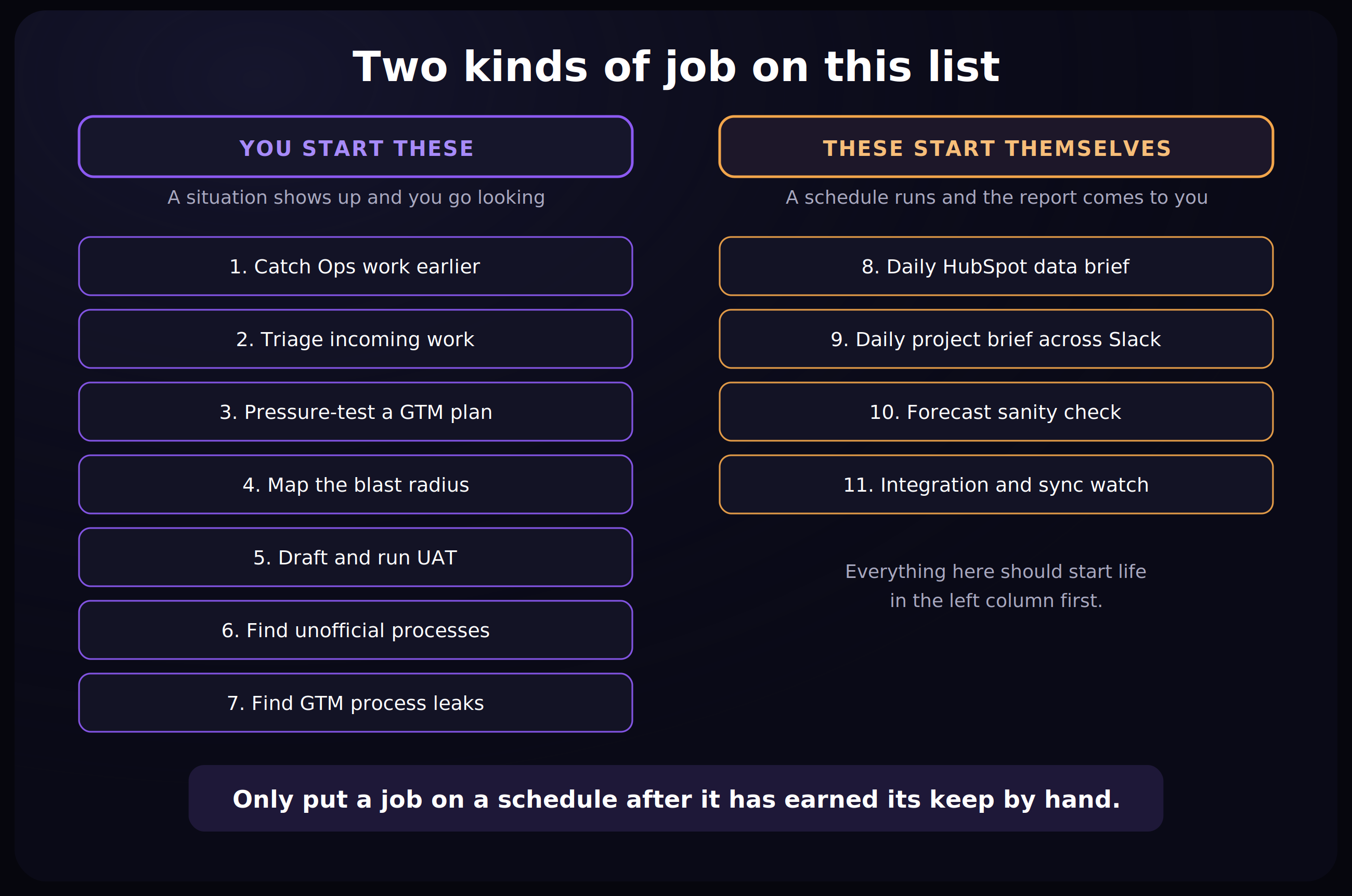
Start with something you already understand well enough to recognize a bad answer.
Run it manually.
Check what Claude catches and what it misses.
Then decide whether connecting more context or making it recurring would save meaningful work.
The more execution AI can handle, the more attention Ops has to put into the surrounding data, architecture, instructions, QA, and decisions.
Somebody still has to know when the output is wrong.
That part is not going away. 😀
References
- Anthropic -- How its Marketing Operations team uses Claude Cowork to automate reporting and campaign builds
- Anthropic -- Schedule recurring tasks in Claude Cowork
- Anthropic -- Claude Tag, for tagging @Claude in a Slack thread
Related Guides
🟠 The Marketing Operations & Revenue Operations Professional's Guide to Claude
A practical Claude guide for Marketing Ops and RevOps pros, with workflows and prompts you can use for planning, analysis, and execution.
🤖 GTM AI Roadmap Starter Kit
A GTM AI starter kit for ops teams to prioritize high-impact use cases, sequence implementation, and build momentum without overcomplicating your stack.

The Marketing Operations Strategist Newsletter
Join 3,500+ operations professionals. Get actionable MOPs tips every month.