Resource
🏖️ Clay for Marketing: My Favorite Use Cases & How to Set Them Up
7/7/2025
🎯 Targeted enrichment🥅 Lead/account scoring📶 Custom signals📥 Inbound enrichment🏛️ Marketing event sponsorship research💻 Google ad/non-traditional data enrichment👩💻 Website research🤝 Partnership research🫛 ICP research/lookalikes🏡 Local listing/hard-to-find/small business research🆕✨🔥 Web Intent: Turn Anonymous Traffic Into Pipeline
(click the arrow ▶️ to open a use case)
🎯 Targeted enrichment
This playbook helps your team enrich phone numbers only when necessary, reducing costs and keeping your systems lean.
What it does for you:
- Lets reps trigger phone number enrichment manually (through a field like “Enrich Phone Number: Yes”)
- Pulls contact or company info into Clay when that trigger is hit
- Uses tools like Wiza to attempt phone number enrichment
- Sends the result (or a fallback message if no number is found) back to your CRM
How to use it:
- Add a custom trigger field in your CRM (like HubSpot) labeled “Enrich Phone Number”
- Set up a Clay table that listens for that trigger and pulls the contact or company info
- Add a fallback AI step to fill in missing data like domain if needed
- Use an enrichment tool (such as Wiza) to find the number
- Return the phone number — or a “not found” message — back to your CRM automatically
This is great for:
- Avoiding unnecessary enrichment costs across large datasets
- Giving reps the info they need, only when they need it
- Reducing clutter and API strain from constant background enrichments
(btw, we are saving money on the upper tier by sending the data through Zapier vs. directly back and forth from HubSpot — another pro tip is that if you have Zapier already, you can potentially save some dollars by leveraging that to send data to and from Clay)
🥅 Lead/account scoring
This playbook helps you find companies that are using specific technologies (like competitors, partners, or adjacent tools) and automatically score them based on fit — so you can target the right accounts faster.
What it does for you:
- Uses Clay’s HD Insights integration to pull a list of companies using selected technologies
- Applies scoring logic based on product usage, employee count, revenue, and region
- Flags high-fit accounts based on custom thresholds
- Automatically finds relevant contacts at those companies for outreach
How to use it:
- Import companies using HD Insights by selecting technologies, location, revenue, employee count, and more
- Limit your pull at first (like 20 companies or 50 credits) to test relevance before scaling
- Customize lead scoring using data like product intensity, company size, and technographics
- Set up total account scores to label companies as high, medium, or low priority
- Find contacts at high-priority companies using filters like job title, seniority, or department
Perfect for:
- Signal-based selling strategies
- Building ICP-aligned account lists
- Prioritizing outreach with real buying context (based on tools they already use)
👨🏫 Instructor in video: Drew Leahy
📶 Custom signals
This playbook helps you track Reddit posts mentioning your brand, product, or keywords — and automatically analyze them using AI.
What it does for you:
- Scans Reddit daily for brand mentions or key terms across selected subreddits
- Pulls in the full post text and links for quick review
- Uses ChatGPT to auto-classify posts (like “asking for help,” “offering services,” or “built with your tool”)
- Adds sentiment analysis to help you gauge tone at a glance
How to use it:
- Create a new Clay table and add the “Find Reddit Mentions” signal
- Choose keywords and subreddits to monitor (like “marketing” or “startups”)
- Preview and run the search to pull in Reddit posts
- Add an AI column with ChatGPT to classify post intent and sentiment
- Map the AI results to columns and review for insights or follow-up
This is ideal if you want to:
- Identify support opportunities or community engagement moments
- Monitor competitor mentions or market trends
- Automate social listening without another expensive tool
👨🏫 Instructor in video: Chris Viglietta
More templates you can use:


📥 Inbound enrichment
This playbook helps you turn anonymous website traffic (like those identified by tools like Vector) into actionable insights for sales — automatically and in real time.
What it does for you:
- Enriches visiting companies with firmographic data (employee count, industry, etc.)
- Uses a data enrichment waterfall to ensure coverage, even if it costs more credits
- Pulls live ad activity using Ad Intel to check for Google, Meta, and LinkedIn ads
- Summarizes ad presence with formulas (total ad count, active platforms)
- Looks up the account owner in your CRM and tags them in Slack
- Sends alerts to a sales Slack channel and/or updates HubSpot records
How to use it:
- Run company enrichment using Clay and optional waterfall providers
- Use HTTP API to connect to Ad Intel and check for active ad campaigns
- Add signals like employee count, ad spend, tech stack (via BuiltWith), etc.
- Use formulas to create summary fields (total ads, platforms running, etc.)
- Pull in account owner from HubSpot and tag them in Slack
- Send an automated Slack alert with all relevant context for sales
- Optionally update CRM records or kick off downstream automations
Perfect for:
- RevOps teams enriching leads before they hit the CRM
- Marketing teams qualifying inbound interest with real signals
- Sales teams who want buying intent without doing research manually
(I had to delete my template because it was not scraping my API key out of it…trying to solve for it 😬. If you are specifically interested in the Adyntel API, check out the template in the non-traditional data enrichment section below)
🏛️ Marketing event sponsorship research
This playbook helps you turn anonymized or partial event attendee lists into actionable data — so you can decide if an event is worth your time and budget.
What it does for you:
- Enriches basic attendee info (like company, title, industry) with LinkedIn profiles and contact details
- Uses AI to identify the right person at each company when names aren’t provided
- Confirms fit using job title relevance and company tech stack
- Helps you decide who to target, invite to side events, or follow up with
How to use it:
- Upload a CSV with attendee companies, industries, and titles
- Use AI + enrichment tools to:
- Identify likely individuals based on company and title
- Find LinkedIn profiles
- Check technographic fit (optional)
- Filter or score results to prioritize outreach or event invites
Ideal for:
- Evaluating the value of event attendee lists
- Planning high-impact pre- and post-event outreach
- Spending event marketing budget more strategically
The prompt:
#CONTEXT#
You are an expert web researcher tasked with identifying a specific person in a specific role at a company using publicly available information from Google and LinkedIn.
#OBJECTIVE#
Find the Full Name and LinkedIn URL of the person in the {{job_title}} at {{company}}.
#INSTRUCTIONS#
- Search Google AND LinkedIn for profiles matching the exact job title {{job_title}} at the company {{company}}.
- If no direct match is found, use Google to search for "{{job_title}} at {{company}}".
- Ignore job listings and focus only on personal LinkedIn profiles (URLs must match linkedin.com/in/ pattern).
- Validate that the profile's current or recent role matches {{job_title}} at {{company}}.
- If multiple candidates are found, select the most relevant or senior person in the role.
- If no suitable profile is found after thorough searching, return "No matching profile found".
#EXAMPLES#
Example input:
Job title: Chief Technology Officer
Company: ExampleCorp
Example output:
Full Name: Jane Smith
LinkedIn URL: https://www.linkedin.com/in/janesmith
If no match:
Full Name: No matching profile found
LinkedIn URL: No matching profile found
💻 Google ad/non-traditional data enrichment
This playbook helps you pull live ad examples from companies so you can analyze competitors, qualify prospects, or gather creative inspiration — without spending hours manually searching ad libraries.
What it does for you:
- Finds companies that match your ICP using Clay’s company search
- Enriches company details like industry, size, and location
- Pulls live ads from LinkedIn, Google, Facebook, and Instagram using the Adyntel API
- Gives you direct links to each ad in the platform’s transparency center
How to use it:
- Import companies using Clay’s “Find Companies” action with your targeting criteria
- Enrich company data using Clay’s built-in enrichment step
- Connect to Adyntel by pasting in your API key and email (pay-per-credit model)
- Ads from each platform are pulled into their own columns, including direct links
Perfect for:
- Agencies doing competitive research or creative audits
- SaaS companies selling to performance marketing teams
- Anyone who wants to monitor ad strategies at scale without manual work
👨🏫 Instructor in video: Drew Leahy
👩💻 Website research
This playbook helps you write highly personalized outbound emails by pulling real case studies from company websites and automatically generating messaging that references real business problems and solutions.
What it does for you:
- Uses Claygent to scrape a company’s website for published case studies
- Extracts key details like case study titles, links, and the challenges and solutions featured
- Enriches company data (industry, size, etc.) and finds relevant contacts (like Heads of GTM)
- Auto-generates outbound messages using Anthropic or Twain (two AI options)
- Supports multi-step email sequences with context-aware follow-ups
How to use it:
- Input a list of company websites
- Claygent scrapes case studies and analyzes their content
- Enrich companies and find target contacts
- Choose your AI method:
- Use Anthropic for custom long-form outbound
- Use Twain for pre-built multi-step sequences
- Review and send personalized emails that reference specific use cases and pain points
Perfect for:
- SDRs, AEs, or founders doing high-quality outbound
- Agencies or platforms targeting companies based on past wins
- Anyone looking to scale cold outreach without sacrificing personalization
👨🏫 Instructor in video: Chris Viglietta
🤝 Partnership research
This playbook helps you detect when a customer or prospect becomes a customer of one of your partners — creating real-time opportunities to co-sell, share insights, or strengthen relationships.
What it does for you:
- Connects to Crossbeam via Clay to detect overlaps between your customers and your partners’ customers
- Identifies the exact company that became a mutual customer and categorizes them (customer, prospect, etc.)
- Pulls in ownership data from your CRM (like Salesforce) to find the right account owner
- Uses AI to craft a personalized message and sends it via Slack to the appropriate owner
How to use it:
- Create a new table in Clay and connect your Crossbeam account
- Select your organization and customer population
- Schedule regular syncs to keep overlap data fresh
- Use Salesforce Lookup to find internal account owners
- Trigger Slack alerts with a personalized AI-generated message whenever a new mutual customer is detected
Great for:
- RevOps, sales, or partnerships teams tracking co-selling opportunities
- Partner-led growth strategies
- Automating alerts that drive real action from relationship data
(btw — you could also use website scraping to view companies listed on a partner website!)
👨🏫 Instructor in video: Bolaji Olayiwola
🫛 ICP research/lookalikes
This playbook helps you scale your outbound by automatically finding companies that closely resemble your best-fit customers.
What it does for you:
- Pulls in a list of high-fit accounts from your CRM (like HubSpot)
- Uses Clay’s Find Local Lookalikes feature to find thousands of similar companies
- Summarizes what each company does in 15 words or less using ChatGPT
- Automatically highlights the top 3 best matches for each imported account
How to use it:
- Connect your CRM (or upload a list manually)
- Import a list of top customers or ideal accounts
- Clay finds lookalikes and enriches them with summaries and metadata
- Export the results or push them into a new Clay table for further enrichment and outreach
This playbook is ideal if you want to:
- Expand your total addressable market with data-backed precision
- Save time on ICP research
- Create smarter prospecting lists in minutes
👨🏫 Instructor in video: Drew Leahy
🏡 Local listing/hard-to-find/small business research
This Clay playbook helps you discover and reach local businesses that are a good fit for your product or service — with minimal manual work.
What it does for you:
- Automatically finds local businesses based on your criteria (industry + location)
- Uses Claygent to generate tailored sales summaries and cold call insights
- Enriches contact info, including decision-maker names, LinkedIn profiles, and emails
- Helps you prioritize and personalize outreach at scale
How to use it:
- Update the Claygent prompt with your business description and value prop (replaces the healthcare example).
- Search for businesses using the built-in Google Maps data source.
- Review enriched data including contacts, websites, reviews, and outreach summaries.
- Start outbound with warm, contextual messaging — no extra research needed.
This playbook is ideal if you want to scale outbound, break into new local markets, or reduce time spent on prospect research.
👨🏫 Instructor in video: Drew Leahy
🆕✨🔥 Web Intent: Turn Anonymous Traffic Into Pipeline
This playbook helps you capture and act on high-intent website traffic by identifying which companies are visiting your site, enriching those accounts, scoring their intent, matching them to your ICP, and alerting your reps automatically.
What it does for you:
- Tracks anonymous website visitors and reveals which companies are on your site
- Uses Clay’s waterfall enrichment to maximize match rates across multiple providers
- Shows each company’s page visits, frequency, time on site, and behavior patterns
- Enriches every visitor with firmographics, tech stack, funding, hiring signals, and CRM context
- Runs ICP matching to flag which visiting accounts fit your ideal customer profile
- Automatically generates an account score based on engagement, recency, and enrichment signals (see example below)
- Identifies relevant ICP buyers and decision-makers inside those companies
- Alerts the right reps instantly via Slack or updates your CRM for immediate action
How to use it:
- Install the Web Intent tracker on your website
- Clay begins capturing and resolving company-level visitor data automatically
- Add enrichment in Clay (firmographics, tech stack, hiring activity, CRM match)
- Layer in ICP filters (industry, headcount, region, tech stack, account tier)
- Build an account scoring model using pageviews, visit frequency, and enrichment signals
- Optional: run a People Search to identify key buyers
- Trigger alerts, sequences, or CRM updates when ICP-qualified or high-scoring accounts visit
This playbook is ideal if you want to:
- Turn anonymous traffic into real outbound pipeline
- Prioritize reps based on real buyer behavior + ICP fit
- Improve ABM performance with account scoring and real-time engagement
- Revive cold or closed-lost deals when they re-engage
- Trigger competitive-switch campaigns when rival users hit key pages
- Build smarter outbound lists using intent + ICP + enrichment

👉 Explore Web Intent on Clay
⛓️ Example Workflow
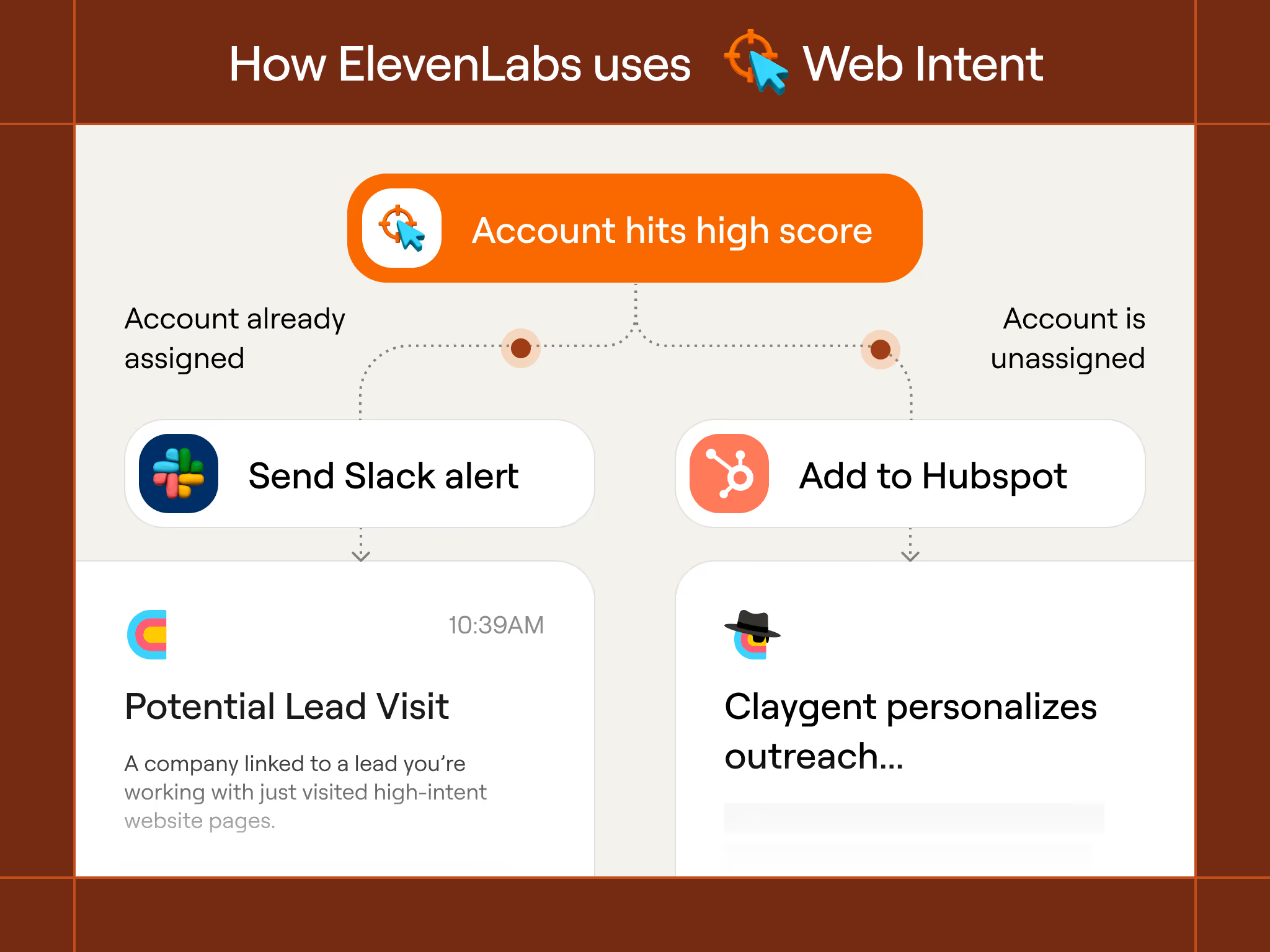
Web Intent Scoring Model (Copy/Paste)
Use this as your base scoring formula. It works for most B2B GTM teams and can be customized inside Clay using simple columns + computed fields.Scoring CategoriesA. Website Engagement (0–50 pts)+15 pts — Visited pricing
+15 pts — Visited “enterprise,” “security,” or technical docs
+10 pts — 3+ sessions in 7 days
+5 pts — Viewed 3+ unique pages
+5 pts — Time on site > 2 minutes
B. ICP Fit (0–30 pts)+10 pts — Industry matches ICP
+10 pts — Employee count within ideal range
+5 pts — Region matches target market
+5 pts — Tech stack match (e.g., uses Salesforce, HubSpot, AWS, etc.)
C. Buyer Fit (0–10 pts)+5 pts — Known decision-maker found (Director, VP, C-level)
+5 pts — Relevant persona exists in CRM
D. Intent Signals (0–10 pts)+5 pts — Recent funding
+5 pts — Active hiring in relevant department
Score Interpretation70–100:High-priority, trigger immediate outbound
40–69:Monitor, add to ABM or nurture
0–39:Low activity, deprioritize for now
Related Guides
🥅 3x Yourself: Safety Net Your CRM or MAP
A CRM and MAP safety guide for Marketing Ops teams to catch silent failures early and protect revenue across routing, syncs, lifecycle, and attribution.
❤️🔥 The MOPs Internal Marketing Kit
Here's a walking deck framework, a work tracker, and an internal marketing cadence that have worked for me: use all three together to make sure you're positioning yourself or your team well.

The Marketing Operations Strategist Newsletter
Join 3,500+ operations professionals. Get actionable MOPs tips every month.