Resource
🔁 The Ultimate Lead + Account Lifecycle Build Guide
7/28/2026
The lifecycle is the backbone of your whole GTM motion and customer journey, and it’s how GTM teams can surround an account efficiently. This guide is the build, logic first -- audit what you have, or design it from scratch, in whatever MAP and CRM you run.
What this is: A practical operating guide for auditing, rebuilding, or extending a lead and account lifecycle.
What you will leave with: Approved stages, a field model, transition rules, routing and SLA requirements, a QA plan, reporting definitions, and an ongoing governance process.
How to use it: Follow the seven open phases in order. Expand the worksheet, platform, and advanced modules only when you need them.
If you do nothing else, get these three right:
First, keep a record's furthest stage reached and its current status in separate fields instead of overloading one (Phase 3).
Then decide which single system is allowed to make each stage change (Phase 4).
And add a sales-acceptance SLA, splitting recycle (worth trying again later) from disqualify (done for good) (Phase 5).
💬 Quick note: At the end of this guide, you’ll see some technical details for each MAP/CRM — these are meant to be helpful directionally, please keep in mind that these tools change super frequently and I do not log into all of them every day, so of course please verify any build details before over-indexing on any technical details!
Start here: choose your path
If you are... | Start with | Your goal |
Refreshing an existing lifecycle | Phase 1: Audit | Preserve what works and repair the smallest necessary layer |
Building from scratch | Phase 2: Choose the grain | Design the model before creating fields or automation |
Adding an account lifecycle | Phase 2, then expand the Account lifecycle module | Connect person and account progress without forcing them into one stage |
Adding a product-led motion | Complete the core guide, then expand the PQL/PQA module | Add product signals without duplicating sales work |
Looking for templates | Expand the Worksheet pack | Turn decisions into a build-ready specification |
The two rules that prevent most lifecycle failures
- Design before you build. Agree on the grain, fields, definitions, transitions, and authority before touching a workflow. Figuring out these stages usually involves Marketing, Sales, Customer Success — be sure to include all of the right people so you don’t make a plan, implement, and then discover that there won’t be full adoption/it doesn’t reflect the reality for your business.
- One field cannot do four jobs. Milestone, operational status, disposition, motion, and consent answer different questions and move on different rhythms.
Phase 1: Audit the lifecycle you have
Use this phase when: A lifecycle exists, but reporting is unreliable, Sales does not trust the handoff, records get stuck, or nobody knows which automation controls a stage.
1. Inventory the operating system
Build one inventory containing:
Inventory | Capture |
Fields | Lifecycle, status, disposition, qualification, consent, routing, and timestamp fields |
Writers | Workflows, Salesforce Flows, Smart Campaigns, integrations, imports, APIs, and manual users |
Sync | Direction, system of record, conflict behavior, and expected latency |
Routing | Assignment logic, exceptions, queues, territories, and round-robin pools |
Reporting | Dashboards, datasets, date fields, exclusions, and conversion windows |
Governance | Business owner, technical owner, approvers, and change history |
2. Inspect the actual records
- Pull the distribution of every lifecycle and status value.
- Find stage-and-timestamp mismatches and any backwards milestone movement.
- Find contradictory field combinations, and compare MAP versus CRM values.
- Find records with no owner, an invalid association, or time beyond the SLA.
- Segment migrated, backfilled, test, spam, customer, and open-opportunity records.
Pro tip: if you have ChatGPT or Claude hooked up to your CRM or MAP, you can have it help you do some initial analysis on the state of your current database. Of course, always check the data, but it can help you quickly figure out how bad your current state is, and can help you open up supporting tickets for this project.
3. Trace the most important transitions
Take one recent record from each of these paths and reconstruct what happened:
- Clean MQL handoff
- Rejected or recycled handoff
- Existing customer conversion
- Open-opportunity conversion
- Duplicate or merged record
- Requalified record
- Named-account or existing-owner exception
For each record, identify the trigger, writer, fields changed, timestamps, assignment, sales action, and reporting outcome.
Pro tip: even better if you can do a “secret shopper” motion and create yourself as a lead, so you can track what happens and what you receive throughout the process.
4. Decide whether to refresh or rebuild
Refresh when... | Rebuild when... |
Teams agree on the stage definitions and you just need a few little updates | Teams disagree on what the stages mean |
The field model can represent reality pretty well | One field is being forced to represent several truths and there is confusion |
A limited set of automations is failing | Write authority and system-of-record rules are undefined |
Reporting can be repaired with reliable history | Historical dates and transitions cannot be trusted |
Routing exceptions are understood | Person, account, opportunity, or product identities are incorrectly connected |
Your deliverable: A lifecycle inventory, issue log, and refresh-versus-rebuild decision.
Definition of done: You can identify the authoritative field, writer, trigger, timestamp, and downstream action for every production transition.
⚠️ Common mistake: Redesigning the lifecycle before proving whether the failure is definitions, data, automation, adoption, or reporting. Don’t build or adjust before you audit!
Phase 2: Choose the grains and association rules
Important decision: What does one record in each lifecycle represent?
Most B2B teams operate several grains in parallel:
- Person / lead: The individual contact.
- Account / company: The buying entity.
- Opportunity: The deal and its pipeline stage.
- Product user or workspace: The identity producing product-usage signals.
Do not bolt a person funnel onto an account motion without defining how they connect.
Pro tip: lots of orgs get frustrated with having to set up autmations or enter in data, so they set their MAP or CRM to auto-update the contact lifecycle stage to align with the corresponding company lifecycle stage. This isn’t an awful idea in itself, but it is if:
- You have not audited your org/are not sure what it will really look like
- Your stage definitions are different per object
- You have a non-basic object model, like you sell to enterprise orgs who have many business units (if you are throwing all of the business units under one company, but each set of associated contacts are in different stages of the customer journey, this will be ultra confusing for reps and your reporting)
Association rules to document
- Person → Account: Which account is primary? What happens after a job change?
- Person → Opportunity: Which association, buying-group role, or Opportunity Contact Role proves involvement in a deal or opportunity?
- Account → Opportunity: How do parent, child, subsidiary, and named-account rules behave?
- Product user → CRM: How do
product_user_id, workspace, CRM contact, and CRM account identities map?
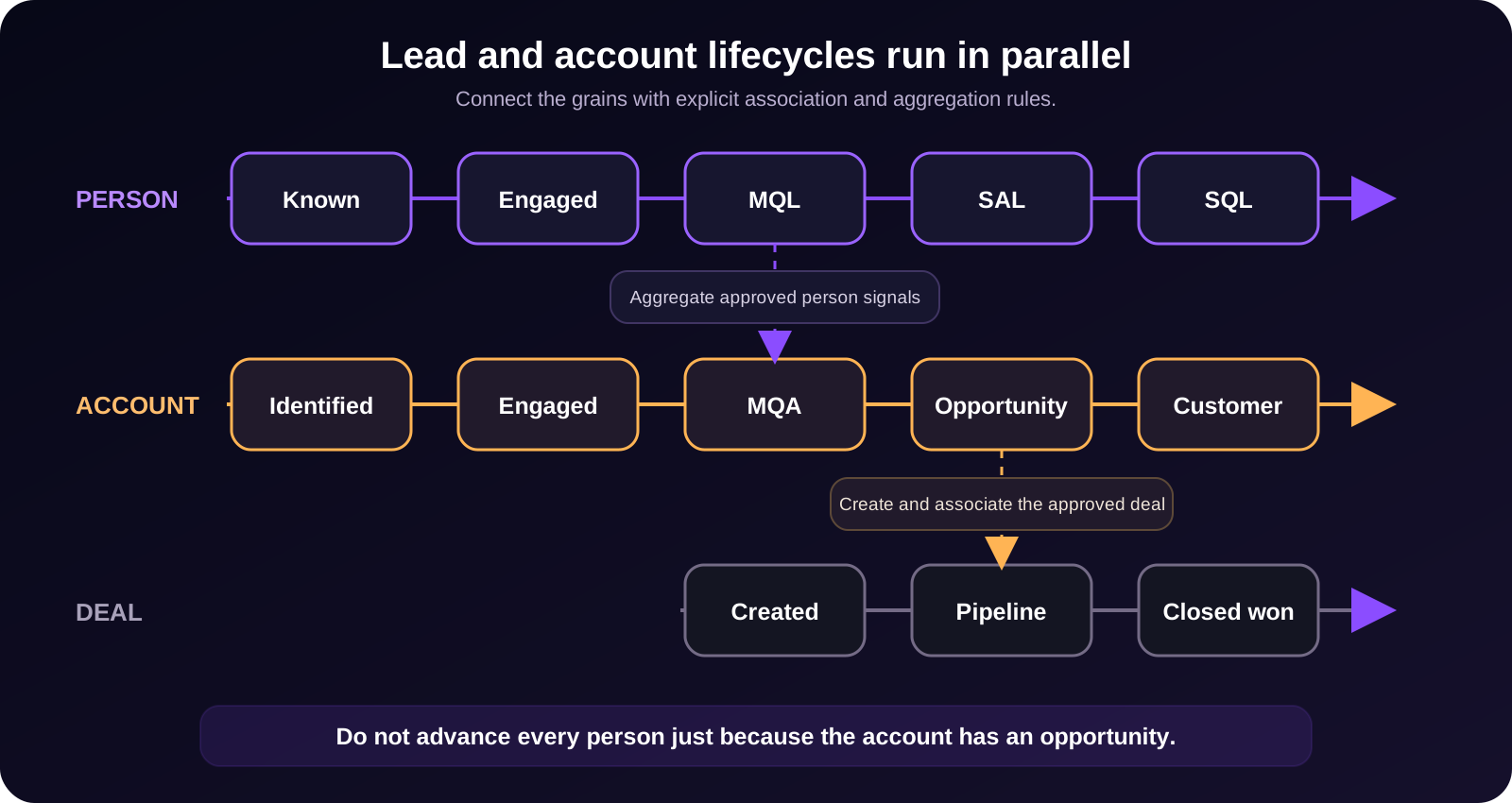
Watch out: Do not advance every employee to Opportunity or Customer merely because the associated account has a deal, UNLESS it makes sense for your business/GTM/ABM model. As always, there is an exception to every rule, but you typically still want visibility into the true status of other contacts on an account, even if 2-3 are in an active deal.
Your deliverable: A grain and association specification.
Definition of done: Every person, account, opportunity, and product signal has a documented identity and association rule.
Common mistake: Treating an account-level event as proof that every associated person reached the same milestone.
Phase 3: Design the lifecycle data model
Decision: Which field answers each lifecycle question?
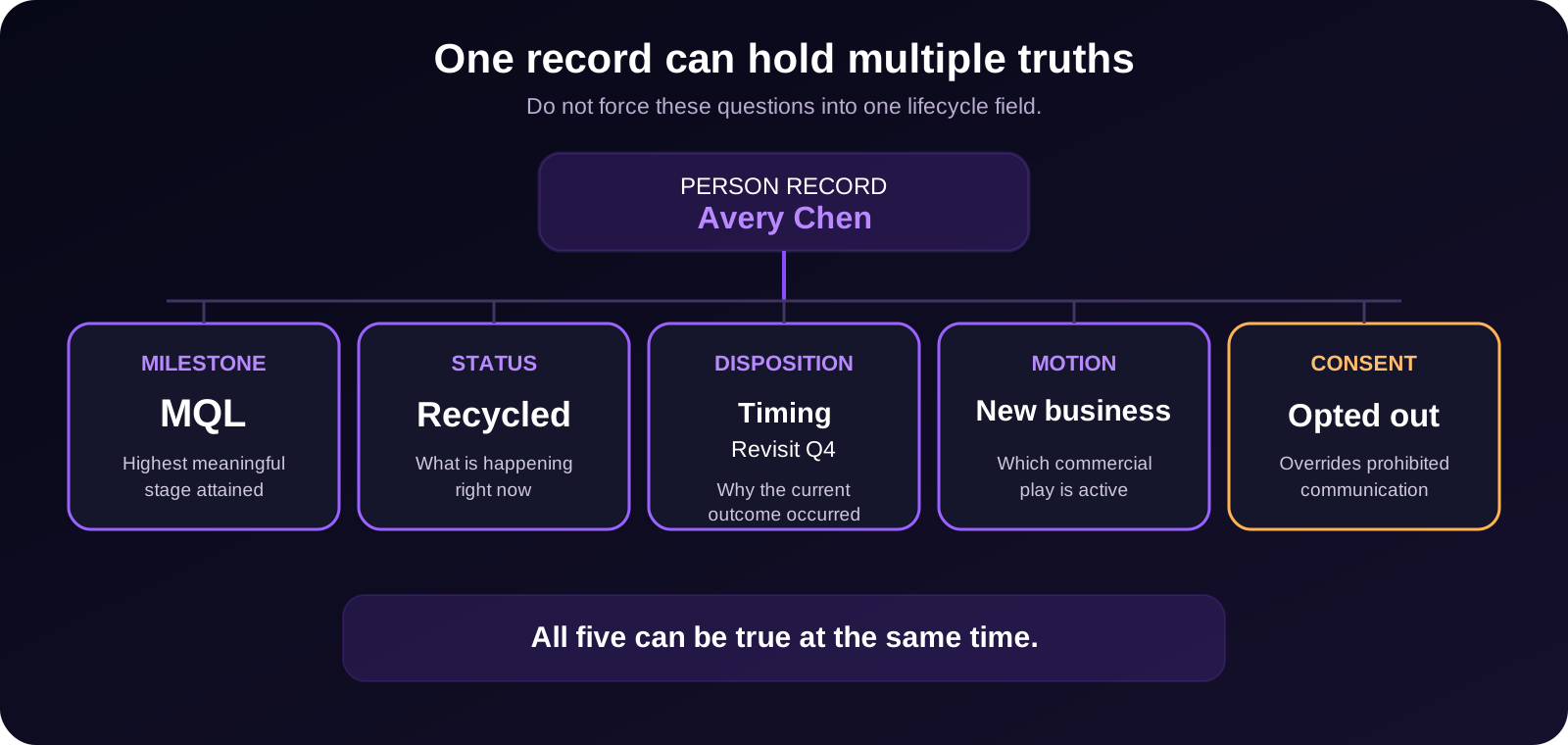
Pro tip: your mileage may vary on how many of these fields you truly need, especially in v1. Of course, having all of these fields will allow you to have the clearest visibility on exactly what is happening with a contact — BUT, it might be a lot for the team to adopt all at once. If you have to pare it down for v1, focus on Stage, Status, and Consent — hopefully consent is already in place for general GTM legal reasons, stage is the furthest stage the contact has gone to, and status helps the team see what is happening now (like if they are being recycled after a ghosted deal).
Separate the fields
Field | Answers | Behavior |
Lifecycle milestone | What is the highest meaningful stage reached? | Forward-only |
Operational status | What is happening right now? | Moves freely |
Disposition + reason | Why was it rejected, recycled, or disqualified? | Changes with the current outcome |
Motion | Which commercial play is active? | Acquisition, expansion, renewal, and other motions |
Consent and preferences | Which communication is permitted? | Separate from lifecycle and overrides prohibited outreach |
Stage-entered-at | How long has the record been in its current operating state? | Updates on current-state entry |
First-attained dates | When did it first reach each milestone? | Set once per milestone |
Latest-attained dates / event history | When did it reach each milestone this cycle? | Updates each cycle |
Transition metadata | What changed it and under which rule? | Stores source, reason, automation, and rule version |
Pro tip: depending on your CRM or MAP, you may have some of these already out-of-the-box, which can save you time — for example, HubSpot already has the stage-entered-at fields. Check before you build something custom!
Define canonical stages
A real stage requires:
- An auditable entry event
- A named owner or authority
- A distinct downstream action
Stage | Definition | Entry event | Downstream action |
Known | Identity captured without meaningful buying engagement | Subscription, import, low-intent conversion, or CRM creation | Make eligible for permissioned awareness or nurture |
Engaged | Meaningful action, not yet qualified | Agreed engagement event | Update scoring or enter an intent-appropriate nurture |
MQL | Meets Marketing's agreed sales-readiness and routing criteria | Score threshold or explicit high-intent override after eligibility checks | Route the handoff and start the SLA |
SAL | Sales accepts responsibility for the handoff. What is the criteria they use to evaluate? | Sales acceptance | Begin the agreed prospecting or qualification play |
SQL | Sales confirms the agreed qualification criteria in a conversation | Confirmed qualification | Begin the opportunity-creation process |
Opportunity | Deal meets the opportunity-creation standard | Approved deal created and correctly associated | Enter pipeline governance and forecasting |
Customer | Purchase reaches the agreed customer event | Closed won, signed, paid, or provisioned | Start onboarding and suppress inappropriate acquisition plays |
Watch out: A booked meeting is not automatically an SQL unless Sales says so. If it matters operationally, model Meeting Booked or Sales Engaged as a stage or status and reserve SQL for confirmed qualification. Don’t forget to get Sales’ buy-in on MQL criteria too — otherwise, it will be an uphill battle to get them to follow up on those leads.
Phase 4: Define and build controlled transitions
These are the typical process stages for a system like this — don’t leave any part out! And make sure you stick with it and monitor, or accuracy will drift over time.
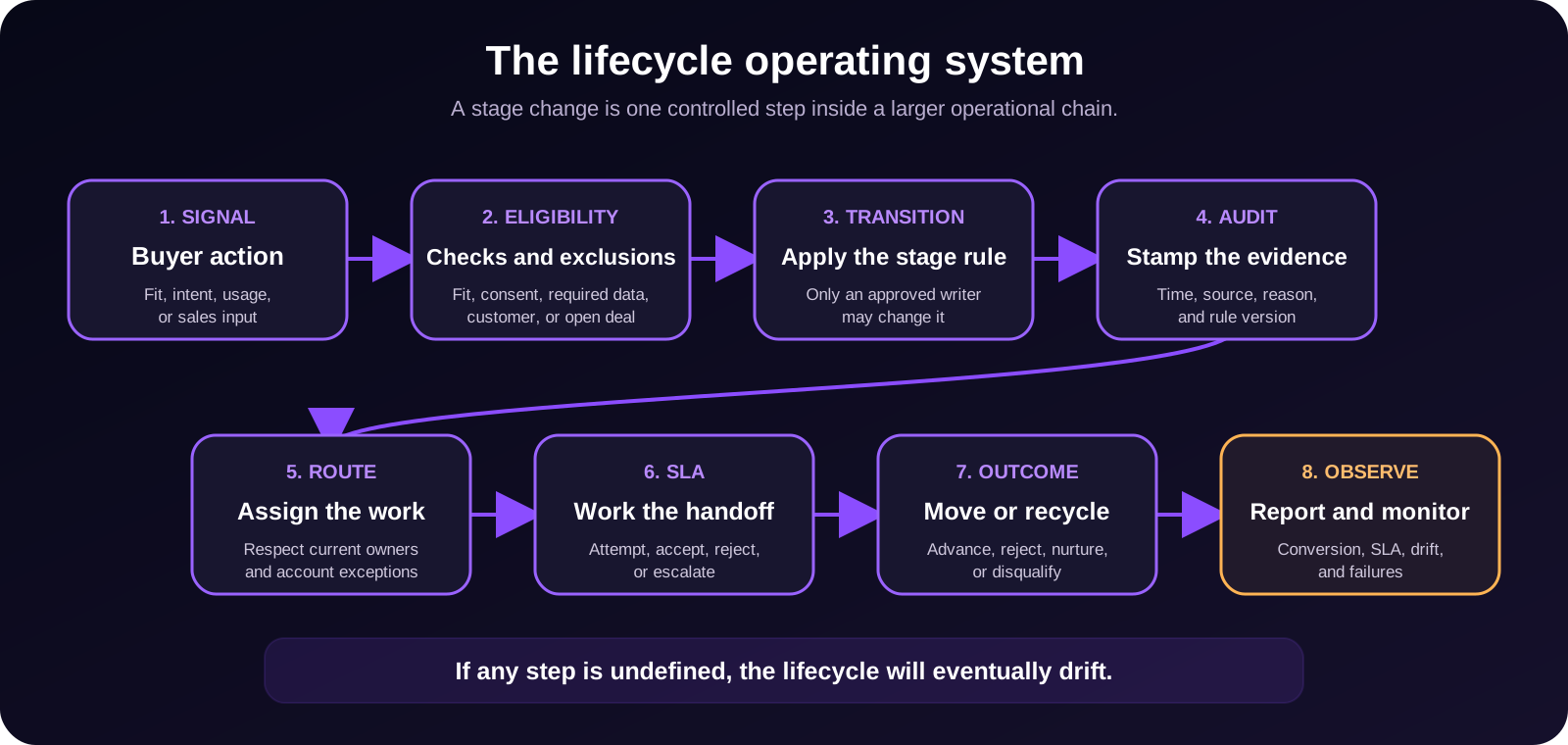
Define authority by transition
The lifecycle value usually lives in two systems at once -- the MAP and the CRM -- so the question isn't which system owns the field, but which system is allowed to make each move. It’s important to make sure they aren’t inaccurately overwriting each other.
Transition | Typical authority |
Known → Engaged | MAP |
Engaged → MQL | MAP or scoring service |
MQL → SAL / Rejected | CRM / Sales |
SAL → SQL | CRM / Sales |
SQL → Opportunity | CRM opportunity process |
Opportunity → Customer | CRM, billing, or deal process |
Why split it this way: if both systems can write the same field, they overwrite each other. Scoring bumps a record to MQL, sales rejects it, automation re-bumps it, and whichever sync update arrives last wins -- so records flap between stages and your funnel numbers stop being trustworthy.
Two rules keep it clean:
- Keep one reporting instance of the field. The value may exist in both systems, but one is the reporting source of truth (usually the CRM). Every funnel report reads from that single copy, so two systems can't hand you two different MQL counts.
- Give systems non-overlapping write authority, and document the tiebreaker. No two systems may write the same transition, and you state explicitly what wins in a conflict -- for example, "the CRM value always wins on this field" -- instead of trusting whichever sync update arrives last.
Build requirements
Check off all of these before building!
Check the current state before writing. Read the record's current milestone before an automation sets one, so you never blindly overwrite a later stage with an earlier one.
Permit only documented previous-stage combinations. Allow a move only from the prior stages your spec marks as valid, so records can't skip or jump stages by accident.
Make triggers safe to rerun. If the same event fires twice -- a sync retry, a reprocess -- the automation should do nothing the second time.
Never overwrite a first-attained date. The "first became MQL" date is set once and kept forever; it's the backbone of your historical funnel reporting. Re-entries update the latest date, not the first.
Update latest-attained dates on every valid cycle. Each time a record re-hits a milestone, stamp the latest date (or add a history row), so you can measure second and third cycles, not just the first pass.
Store transition source, reason, automation, and rule version. Every write carries its own audit trail -- what triggered it, why, which automation ran, and which logic version -- so you can debug, explain, and roll back any change.
Avoid duplicate work. Don't create a second task or alert when one already exists for the same record and reason. Duplicate sales work floods queues and erodes trust in the whole system.
Log failures and records that cannot transition. When a record meets the criteria but can't move -- a missing owner, or a blocking exclusion rule -- record it somewhere visible.
Example Worked transition: Engaged → MQL
Here’s an example of a fully planned our transition:
Decision | Example |
Entry | Explicit demo request, or ICP fit = true AND engagement score >= [threshold] |
Eligibility | Valid identity, required routing data, permitted sales follow-up, and no suppression condition |
Exclusions | Customer, open opportunity, active sales-owned record, test, or spam |
Association | Use the verified primary account and approved person-account relationship |
Fields written | Milestone, current status, first and latest MQL dates, transition source, reason, and rule version |
Routing | Existing account owner first, then territory, then controlled round-robin |
Retry behavior | Do not duplicate the work item, overwrite first MQL, or restart the SLA for the same event |
Reporting | Count qualification events by cycle and unique qualified people separately |
Your deliverable: A transition registry and field-authority matrix.
Definition of done: Every transition has an entry rule, exclusions, writer, fields changed, timestamps, routing action, retry behavior, and monitoring owner.
Common mistake: Building automation around a stage label without defining the evidence and downstream action.
Phase 5: Route the handoff and manage outcomes
Define qualification eligibility
Document:
- Fit requirements
- Engagement and intent thresholds
- Explicit high-intent overrides
- Consent and suppression conditions
- Required routing data
- Customer, open-opportunity, and active-owner exclusions
Keep the logic simple enough that Sales can understand why a record surfaced. A qualified demo request should not have to accumulate arbitrary content points first. I find that most teams can handle 3-7 signals before there is “too much reading/too much math” and it slows down next steps.
Build the acceptance loop
For every qualification cycle, record:
- Qualification or handoff time
- Assignment time
- First-attempt time
- First-connected time
- Acceptance or rejection time
- Current disposition time
Report both time to first attempt and time to disposition. Use the current-cycle handoff date for the current SLA, not the first MQL date from a previous cycle. This will help drive clarity and accountability.
Protect routing exceptions
Be careful about accidentally re-assigning owned companies or causing other organizational confusion. Some best practices to look out for:
- Respect existing owners and named-account rules.
- Protect customers and open opportunities.
- Define territory, round-robin, capacity, queue, and fallback behavior.
- Escalate or reassign only under a documented policy.
- Surface the handoff where Sales already works.
Separate outcomes
The core idea: when a lead doesn't move forward, most teams dump every "no" into one bucket — usually "disqualified" or "closed lost." That's a mistake, because these four outcomes behave completely differently, and flattening them is how you lose warm pipeline and break compliance without noticing.
Outcome | Use when | System behavior |
Recycle | Timing or present readiness is temporary | Return to nurture and allow re-entry on a new signal or defined delay |
Disqualify | Record is ineligible for the current sales motion | Suppress from that motion and record the reason |
Merge / quarantine / purge | Duplicate, spam, or hygiene issue | Follow the data-quality policy |
Delete | Retention or privacy policy requires removal | Execute the governed deletion process |
Recycle — temporary. The lead is fine; the timing is off (no budget this quarter, no active project, they went dark). So you don't kill it — you send it back to nurture and let it re-enter on a new signal or after a set delay. This is usually your warmest future pipeline, so the worst thing you can do is bury it with the genuinely dead records.
Disqualify — done for this motion. The record is truly ineligible for the sales play you're running: not your ICP, no buying authority, a competitor, a student or personal email, wrong geo. You suppress it from that motion and record why. Note it isn't deleted — it might still be valid for a different motion later (a self-serve path, a future launch), and the reason itself is data you'll want.
Merge / quarantine / purge — a data problem, not a lead decision. Junk like duplicates or test records isn't a judgment about fit; it's hygiene. It follows your data-quality policy — merge the dupes, quarantine suspected spam, purge the junk — and it's handled by ops, not by a rep's disqualify call.
Delete — compliance. A privacy request (a GDPR/CCPA "delete me") or a retention rule requires actual removal. You run the governed deletion process, which is auditable and often legally required to be complete. This is the only outcome that truly removes the record; the other three keep it.
Monitor operational health
If you don’t monitor your lifecycle, it will drift over time and the data will become inaccurate or leads will get dropped. Some good monitoring best practices:
Alert on:
MAP-versus-CRM mismatches. The same record shows a different stage in the MAP than in the CRM, which means the sync broke or the two systems are overwriting each other. Catch it before your reports diverge.
Illegal transitions. A record reached a stage it shouldn't be able to from where it was -- Known jumping to Customer, or a backwards move. It points to a broken automation or a bad import that slipped past your allowed-previous-stage rules.
Missing owners. An MQL or later with nobody assigned. An unowned lead is a lead no one is working, so it's a routing failure that costs pipeline.
Missing timestamps. A record sits at a stage with no matching stage-entered date. Your velocity and conversion math break, and it signals the transition fired incompletely.
Duplicate alerts or work items. One record spawned two tasks for the same event. That's a trigger that wasn't safe to rerun, and it floods sales with noise until they stop trusting the alerts.
Workflow errors. The automation itself failed -- an action errored or a sync bounced. These fail silently in most platforms and leave records stranded, so surface them!
Invalid associations. A broken relationship, like a contact still tied to a former employer, or an opportunity with no contact roles. It breaks routing and account roll-ups, and traces back to your association rules.
Records sitting beyond SLA. Anything past its agreed time in a stage, like an MQL sales never accepted. This is your aged-record detector, and where leads go to die in a queue.
Your deliverable: A routing and SLA matrix, disposition model, and monitoring specification.
Definition of done: Every qualified signal produces one correctly assigned, measurable work item or a documented exception.
Common mistake: Treating recycle, disqualification, data quality, and deletion as the same outcome.
Phase 6: Test, migrate, and launch
Test in this order
- Complete the transition and QA specifications.
- Build new logic against shadow fields where possible.
- Test individual transitions.
- Test complete end-to-end paths.
- Compare old and new outcomes.
- Run a controlled pilot.
- Make the new fields authoritative.
- Monitor the launch cohort separately.
Minimum QA scenarios
Happy path. A record moves cleanly through every stage in order. Confirm each transition fires and the milestone advances, with first-attained dates stamped once.
Skipped stage. A record qualifies out of order and jumps ahead. Confirm it's allowed only where a documented rule permits, and held or flagged otherwise.
Duplicate or merged record. Two records exist for the same person or account. Confirm they merge cleanly and the survivor keeps the correct stage and history, with no double alerts.
Existing contact. A known record re-enters through a new form fill. Confirm it re-engages without resetting its first-attained dates or spawning a duplicate.
Existing customer. A current customer takes a new-lead action, like filling a demo form. Confirm it's suppressed from the new-lead motion and routed to the right team (CSM or AE), not the SDR queue.
Open opportunity. A record with a live deal attached hits an MQL trigger. Confirm it routes to the deal owner and doesn't spin up a duplicate net-new play.
Invalid association. A record has a broken or missing relationship, like no company or the wrong account. Confirm it's held for review instead of routed on bad data.
Job change. A contact moves companies. Confirm your rule fires -- the old record is flagged and preserved, and a new record is created at the new account per your model.
Recycled or requalified record. A record loops back and re-qualifies. Confirm the milestone holds forward-only, while the status flips to Recycled and the latest-attained date updates without overwriting the first.
Opted-out record. A record qualifies but has withdrawn consent. Confirm no outreach fires -- consent overrides the stage.
Missing owner. A record reaches routing with no valid owner available. Confirm it falls to the fallback pool and raises an alert instead of sitting unassigned.
Sync delay. The MAP and CRM are temporarily out of step. Confirm there's no flapping -- the documented conflict rule holds and the record settles on the right value.
Workflow retry. The same automation fires twice. Confirm it's idempotent -- no duplicate work and no restarted SLA.
Rollback. You need to undo a bad change or a bad launch. Confirm you can revert to previous or shadow values cleanly, with the audit trail intact.
Pro tip: you can pop your documentation and these QA cases into your LLM of choice and have it create a QA/UAT doc of scenarios to test, for you!
Migration and backfill rules
Be careful what you migrate or backfill — if you implement too many blanket choices, it can really muddy your new model. Some tips:
- Backfill only when reliable historical evidence exists.
- Never use the migration date as the original qualification date.
- Preserve unknown dates as unknown.
- Tag backfilled records.
- Record the cutover date and logic version.
- Segment the migration cohort in trend reporting.
- Define a rollback trigger and rollback owner before launch.
Watch out: Reports do not settle automatically. Make the cutover, migration cohort, and date logic visible.
Your deliverable: A QA matrix, cutover plan, backfill policy, and rollback procedure.
Definition of done: The tested results match the specification, the migration is visible in reporting, and the team can safely reverse the change.
Common mistake: Testing only the clean path and declaring the workflow production-ready.
Phase 7: Report and govern
Define every metric
For each metric, specify:
- Grain. The unit each row of the metric counts. Example: person -- each lead counted once -- rather than account or opportunity.
- Numerator and denominator. The two numbers the rate divides. Example: numerator = leads that reached SQL; denominator = leads that reached MQL in the cohort. So the rate is SQL ÷ MQL.
- Conversion window. How long a record has to make the next move before it counts as not converted. Example: 90 days -- an MQL that reaches SQL within 90 days counts as converted, and one that takes longer doesn't.
- Date basis. Which date anchors a record to a time period. Example: the first-attained MQL date, so a lead lands in the cohort of the month it first became an MQL, not the month it converted.
- Re-entry treatment. How you handle a record that qualifies more than once. Example: count each unique person once per cohort using their first MQL cycle, so a lead that recycled and re-MQL'd doesn't get counted twice.
- Stage-skip treatment. How you count records that jumped a stage. Example: a lead that went straight to SQL with no recorded SAL still counts as having passed through SAL, so the funnel math doesn't leak.
- Exclusions. What you strip out before calculating. Example: test records, spam, existing customers, and internal or employee domains.
- Segments. How you slice the metric. Example: by source (inbound vs outbound) and by motion (new business vs expansion).
- Cohort maturity. How you flag cohorts that haven't had time to fully convert. Example: mark the most recent 90 days of cohorts as "still open," so a partial recent month isn't misread as a drop in conversion.
Minimum reporting set
- Cohort-based milestone conversion by source and motion. For each entry cohort, the conversion rate between every milestone -- Lead to MQL to SAL to SQL and onward -- split by source and motion. It shows exactly where the funnel leaks, on a fair cohort basis instead of a vanity average that blends new and old records together.
- Time to first attempt, acceptance, and qualification. How long a handed-off record takes to get its first sales touch, and from there to acceptance and to qualification. This is your velocity view -- it exposes slow handoffs and the stages where records stall, and it's the fastest way to catch a broken sales follow-up.
- Acceptance, rejection, recycle, and disqualification by reason. Counts of what happened to your MQLs, broken out by reason code. A flood of "not ICP" rejects means your targeting is off; a pile of "no budget" recycles means the timing play matters. This is what turns disposition data into something you can tune.
- Pipeline and revenue by qualification cohort. For each MQL or SQL cohort, the pipeline and closed revenue it eventually produced. This is the report that ties the lifecycle to money and proves which sources and motions generate revenue, not just volume.
- Repeat-cycle performance. How recycled and requalified records perform on their second or third pass versus first-timers. It tells you whether recycling is worth the effort, and you can only build it because you kept latest-attained dates and history.
- SLA attainment and aged-record inventory. The share of handoffs accepted inside the SLA window, plus a live count of records aging past it right now. One holds the loop accountable over time, the other is your daily "who's dying in a queue" list.
- Operational-health exceptions. The volume and trend of your monitoring alerts -- mismatches, missing owners, and the rest. It's a health dashboard for the machinery itself, so you fix recurring data-integrity problems at the root instead of one record at a time.
For velocity, report the median plus a tail percentile such as p75 or p90. Do not rely only on the average.
Universal conversion percentages are rarely comparable because stage definitions, samples, and conversion windows differ. Benchmark against your own mature cohorts first.
Establish governance
This will help the team work quickly and efficiently, without role confusion.
Governance item | Decision |
Business owner | Who owns the definitions and business outcomes? |
Technical owner | Who owns fields, automation, integrations, and monitoring? |
Reporting owner | Who owns metric definitions and data quality? |
Review cadence | When are conversion, SLA, drift, and exceptions reviewed? |
Change control | Who approves a new stage, field, writer, or transition rule? |
Documentation | Where are the current rule version and change history recorded? |
Your deliverable: A reporting specification and lifecycle governance charter.
Definition of done: The lifecycle has named owners, stable metric definitions, operational alerts, and a controlled process for changes.
Common mistake: Treating launch as the end of the project.
Final self-assessment
We know whether this is a refresh or rebuild.
Every lifecycle grain and association is documented.
Milestone is separate from status, disposition, motion, and consent.
Every stage has an auditable entry event, authority, and downstream action.
Write authority is defined for every transition.
First and repeat qualification cycles can be measured.
Routing protects owners, accounts, customers, and open opportunities.
Sales accepts or rejects handoffs against an SLA.
QA covers failures, duplicates, retries, and rollback.
Reporting uses mature cohorts and documented metric definitions.
Monitoring catches sync, routing, timestamp, and association failures.
Lifecycle changes have named approvers and version history.
Your first unchecked item is the first project.
Action plan
After the seven phases and the self-assessment (which tells you your first unchecked box is your first project), this table is where you scope that project into something accountable and safe, instead of a vague "we should improve the lifecycle.
Capture | Definition | Your decision |
Problem area | The specific thing that's broken | ㅤ |
Root cause | Why it's broken -- definitions, data, automation, adoption, or reporting | ㅤ |
Refresh or rebuild? | Patch the smallest necessary layer, or rebuild the model | ㅤ |
Proposed fix | What you'll actually change | ㅤ |
Owner | The one person accountable for it | ㅤ |
Dependencies | What has to happen first, or who else you need | ㅤ |
Current baseline | The number today, so you can prove improvement later | ㅤ |
Success measure | How you'll know it worked (the target the baseline should hit) | ㅤ |
Sequence | The order you'll tackle things in | ㅤ |
Target date | When it's due | ㅤ |
Shadow-mode checkpoint | Where you validate the new logic against shadow fields before go-live | ㅤ |
Rollback trigger | The condition under which you'd revert, decided before launch | ㅤ |
More resources:
Worksheet pack: expand the six build templates
Optional module: Account lifecycle and MQA
Use this module when your GTM motion depends on accounts, buying groups, ABM, or enterprise sales.
Keep account concepts separate
- Milestone: Identified → Engaged → MQA → Opportunity → Customer
- Motion: Acquisition, expansion, renewal
- Status: Active, onboarding, churned, and other current states
- Target status: Named or non-target account
- Tier: Strategic priority, not buyer progress
An inbound non-target account can become MQA. A Tier 1 account can remain unengaged.
Define the MQA
An MQA usually combines account fit with aggregate engagement, buying-group activity, intent, or an explicit high-intent action.
One low-intent contact should rarely qualify the account. One strong hand-raise may. Validate the rule against opportunity creation and win data.
Define the roll-up rules
Document primary-account logic, parent-child handling, domain matching, job changes, buying-group roles, engaged-contact count, coverage, aggregate engagement, and account-level intent.
Contacts keep their own milestones. Selected activity can roll up to the account, and the account milestone can drive the play.
Keep post-sale signals in the correct motion
A strong signal from a new department inside an existing customer is usually an expansion signal, not a new account milestone.
Worked example: Identified → MQA
- Entry: three or more buying-group contacts engaged in 30 days AND account fit = true.
- Eligibility: verified primary account; not already an open opportunity or customer for this motion.
- Roll-up: engaged-contact count plus intent, de-duped by primary domain.
- Routing: existing account owner first, else account-based round-robin.
- Reporting: count MQAs by cycle, and keep unique accounts separate from events.
When paths collide: if the same account also qualifies through product usage (PQA) or a person-level MQL, preserve every source, route on the highest-priority current signal, and report unique records separately from events. See the product-led module.
Optional module: Product-led lifecycle, PQL, and PQA
Use this module when product behavior is a meaningful qualification or expansion signal.
PQL
A PQL has experienced a defined product value moment (like signing up for PLG product), matched a usage pattern associated with conversion or expansion, and passed the required fit and suppression checks. A PQL is common amongst PLG products. Someone could perform marketing activities to become a MQL but not be in product, so not be a PQL — on the flip side, they could move forward with product right away and become PQL without being MQL.
Run PQL as a parallel qualification path. A person may reach Sales through marketing engagement, product usage, or an explicit hand-raise.
A widely cited OpenView guide reported 15-30% PQL conversion and said one in four SaaS companies in its 2021 benchmark had rolled out a PQL strategy. Treat these as historical directional claims, not universal benchmarks.
PQA
A PQA combines account-level fit with a defined product-usage pattern. That may involve several users or one high-fit user with a strong signal. For example, if you have 3+ teams sign up for PLG product, you might then consider that account to be PQA and want Sales to try to upsell them into a larger enterprise contract.
Identity spine
Document
product_user_id, workspace_id, CRM contact ID, CRM account ID, matching method, confidence, event timestamp, signal version, delivery latency, and data freshness.Validate the signal
Backtest the proposed rule on historical cohorts, validate it on later cohorts, and monitor conversion, expansion, and retention.
When paths collide, preserve every qualification source, route on the highest-priority current signal, avoid duplicate work, and report unique qualified records separately from qualification events. The account-level version of this lives in the Account lifecycle module.
Platform implementation notes: HubSpot
- Lifecycle Stage lives on Contacts and Companies and provides the high-level marketing and sales view.
- HubSpot also has a separate Lead object with its own pipeline and the older Lead Status property. Define whether qualification lives in Lifecycle Stage, the Lead object, or both.
- SAL is not a native lifecycle value, although custom lifecycle stages are supported, so you can add it if it is relevant.
- HubSpot provides read-only stage calculated properties, including date entered, date exited, latest time, and cumulative time.
- Calculated properties are not a row-level transition ledger. Use property history in the warehouse or a custom transition object when every cycle, signal, rule version, and disposition must be retained.
- The workflow action to rotate a record to an owner requires Sales or Service Hub Professional or Enterprise and activated paid users.
Platform implementation notes: Marketo
- Create one custom field whose only job is to hold the lifecycle stage, and treat that field as the home of the milestone.
- Drive transitions with Smart Campaigns or the Revenue Cycle Modeler.
- Adobe supports transition rules in the model and recommends trigger-based transitions for velocity reporting.
- Pick one transition approach and document it.
- A Default Program is a container; a Smart Campaign is the automation asset.
- Write
{{system.dateTime}}to a persistent custom DateTime field.
- Marketo has a native Change Owner step. Assigning a Salesforce Contact to a lead queue can create a duplicate Lead, so filter queue assignment to Salesforce Leads.
- Advanced BI Analytics requires a separately purchased add-on.
Platform implementation notes: Pardot / MCAE
- Salesforce does not provide one configurable Lifecycle Stage field shared by Leads and Contacts. You’ll have to create a custom one if you want one.
- Account Engagement's native reporting derives milestones from events. Assignment may count as MQL, and an Opportunity Contact Role may count as SQL.
- For a custom lifecycle, create matching fields on Lead and Contact and map the value through lead conversion.
- Use Salesforce Flow or MCAE automation and define sync behavior explicitly. In most cases, people use Salesforce Flows to house the main automation for lifecycle change, not Pardot/MCAE — due to flexibility.
- B2B Marketing Analytics includes a standard Pipeline dashboard with derived MQL and SQL definitions.
Platform implementation notes: Salesforce Marketing Cloud
SFMC has no native B2B lead-lifecycle model. Keep the stage and qualification model in Sales Cloud and use SFMC to orchestrate cross-channel journeys around it. You can try to build the logic in Journey Builder, but it’s not really meant for this use case so you will run into annoying limitations.
Treat Data Extensions as a separate copy of lifecycle data, not authoritative CRM history.
Advanced module: AI on the lifecycle
IMPORTANT: build and trust the deterministic lifecycle first. Do not jump over the rest to go immediately to AI-driven lifecycle automation.
Safe division of labor
- AI classifies or extracts a structured signal.
- Deterministic policy decides whether the signal meets a stage criterion.
- Suggested changes remain human-reviewed until measured precision meets the agreed standard.
- Customers, open opportunities, owner changes, and qualification milestones receive stronger controls.
Production guardrails
Use shadow-mode evaluation, false-positive and false-negative review, an approved processing environment, role-based permissions, an audit log, and a rollback procedure. Basically: governance best practices.
An MCP connection can let an AI client read data or take actions, but it does not run continuously by itself. Continuous execution requires a scheduler, agent runtime, or workflow. Ideally, make sure a human is in the loop or at least monitoring daily.
HubSpot provides an official connector for Claude. HubSpot notes that custom validation rules are not applied to connector writes, so material changes still need human review and a controlled write path.
Worked pattern: AI-assisted stage progression
A frequent ask is to let AI advance lifecycle stages from live behavior. A safe version, using Claude and a custom HubSpot MCP:
- The MCP gives Claude read access to the live engagement a static score misses -- opens, replies, meetings, and page views.
- Claude proposes a stage change when the behavior has outrun the recorded stage, with the supporting evidence attached.
- Deterministic policy, not the model, decides whether the proposal meets the stage's entry criteria.
- Low-stakes, reversible moves can write automatically with an AI-set marker, while anything touching an open opportunity, a customer, an owner change, or a qualification milestone routes to a human to confirm.
- Every write records why it fired and under which rule, and stays reversible.
Start with read access. Grant write access only after shadow-mode precision meets your agreed bar, and gate the write path with the same eligibility and exclusion rules as any other transition.
Quick glossary
- MQL: Marketing Qualified Lead. Meets the agreed marketing-owned sales-readiness and routing criteria.
- SAL: Sales Accepted Lead. Sales accepts the handoff and agrees to work it.
- SQL: Sales Qualified Lead. Sales confirms the agreed criteria in a conversation.
- MQA: Marketing Qualified Account. Meets the agreed account-level fit, engagement, intent, or buying-group criteria.
- PQL: Product Qualified Lead. Matches a validated product-usage and fit rule.
- PQA: Product Qualified Account. Matches an account-level product-usage and fit rule.
- SLA: Service Level Agreement. The agreed time window and outcome standard for a handoff.
Related Guides
❤️🔥 The MOPs Internal Marketing Kit
Here's a walking deck framework, a work tracker, and an internal marketing cadence that have worked for me: use all three together to make sure you're positioning yourself or your team well.
📤 The Complete Guide to Email Deliverability
An email deliverability guide with templates and best practices to improve inbox placement for marketing, sales, and transactional email.

The Marketing Operations Strategist Newsletter
Join 3,500+ operations professionals. Get actionable MOPs tips every month.