Resource
🕵️♀️ My Favorite Clay Enrichment Providers for Marketers
7/29/2026
This is my practical shortlist of data sources I reach for in Clay when I am building marketing workflows at Vector and for clients.
What this covers: Eight providers and tools I use for contact data, ad intelligence, search intelligence, custom research, and web scraping.
How to use it: Start with the quick-picker table, then jump to the provider that matches your use case.
Want more marketing workflows too? This guide focuses on the data sources. My earlier guide, Clay for Marketing: My Favorite Use Cases & How to Set Them Up, covers complete marketing plays including targeted enrichment, scoring, custom signals, inbound enrichment, event sponsorship research, and website research.
*Disclosure: I am a Clay Creator and Partner. However, the provider choices and opinions are mine.*
The short version
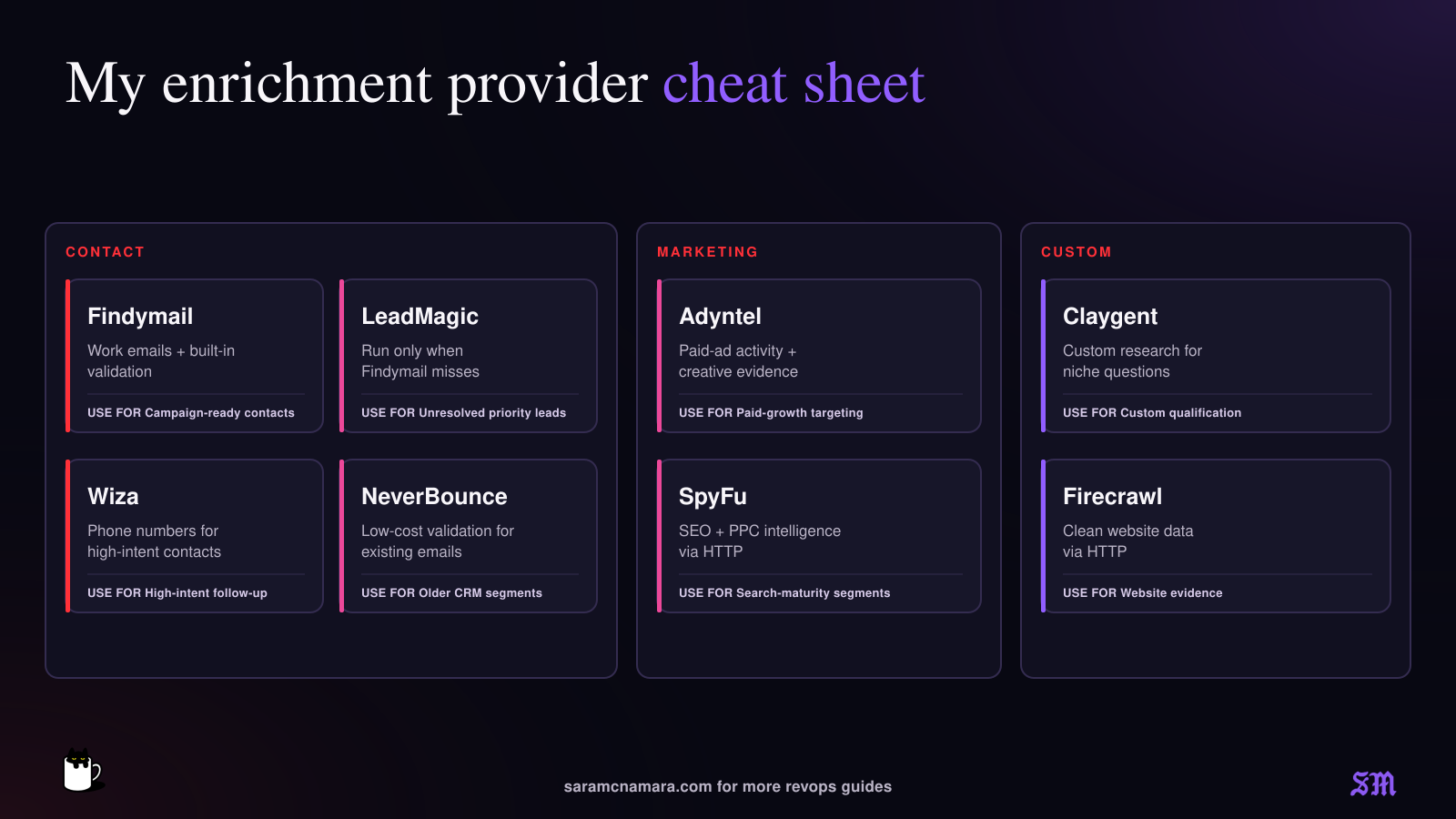
Here are my favorite vendors:
Provider or tool | My go-to use | Example marketing use case |
Findymail | Work emails and email validation | Fill missing work emails before a campaign or nurture |
LeadMagic | Hard-to-find work emails | Run as a fallback when the first email source misses — great for really hard to find emails and phone numbers |
Wiza | Phone numbers | Add phones only for high-intent leads or priority accounts (it can get pricey) |
NeverBounce | Low-cost email validation | Revalidate an older CRM segment before activation — this is a great, cheap final check for warm leads, like PLG |
Adyntel | Paid-ad activity and creative data | Find companies actively investing in paid acquisition — great to see creatives, # of ads per ad platform |
SpyFu via HTTP | SEO and PPC intelligence | Segment accounts by estimated website visitors or estimated ad spend |
Claygent | Hard or custom research | Answer a niche qualification question no provider covers cleanly, OR use to validate that the records have the right title and company before you spend $$$ on costly email, phone, etc |
Firecrawl via HTTP | Web scraping | Pull clean website content for classification or personalization |
The rule I use: since you can have Claygent check things like current company for pennies on the dollar (with ChatGPT Helium model, you can have it research a bunch of data points for 1 credit per row), I’ll usually run that first before spending a bunch of credits with the deterministic enrichment providers, who tend to be more $$$.

1. Findymail: work emails and validation
Best for: Finding a work email and validating it in the same motion — or, if you already have email addresses, validating those.
Findymail is usually my first stop for email search or validation. It returns verified results for its own email search, so I do not have to build a separate validation step for every email it finds. I’ve found their validation to be the most accurate, with the second-closest being NeverBounce.
Example Clay use case: turn event leads into campaign-ready contacts
- Import registrants with name, company, and company name or domain.
- Use Findymail to find a verified work email when the email is missing or personal.
- Keep the original source, enrichment date, and provider result in separate columns.
- Push only valid, permissioned records into the correct follow-up campaign.
Where it earns its keep: Webinar lists, content syndication, small event exports, partner lists, and CRM records with missing work emails.
Watch out: A deliverable email does not create consent. Keep contactability separate from marketing permission and enrichment status.

2. LeadMagic: the high quality fallback for hard-to-find work emails
Best for: Contacts the first email provider could not resolve. Great for phone numbers too.
I use LeadMagic later in the waterfall, not automatically on every row. That’s a great pattern to follow — figure out which cheapest option works best for each type of list, then layer on higher quality (and more expensive) providers as needed. LeadMagic is awesome for that.
Example Clay use case: recover missing contacts in a named-account campaign
- Run your primary email finder across the campaign list.
- Add a condition so LeadMagic runs only when the first result is blank or otherwise unusable.
- Pass the cleanest identity inputs you have, ideally full name plus company domain or a professional profile URL.
- Store the returned status and confidence next to the email before activation.
Where it earns its keep: Smaller companies, unusual domains, recent job changes, and priority contacts where another attempt is worth the spend.
Watch out: Do not let two providers overwrite the same final-email field without retaining source and timestamp. You will regret that the first time you audit a bounce.

3. Wiza: phone numbers for the leads that justify them
Best for: Adding a phone number to a known person when you already have solid identity data OR for hard-to-find email addresses. Especially great for searching individual profiles.
Phone enrichment can get expensive quickly, and have a limited time window of validity, so I only enrich when I know a rep is about to call that prospect.
Example Clay use case: fast follow-up for high-intent inbound
- Start with demo requests and pricing-page conversions, or another agreed high-intent segment.
- Confirm the person and company match before running a phone lookup.
- Use Wiza on the remaining priority rows.
- Send the result to the CRM with a source, lookup date, and any returned phone status.
Where it earns its keep: Demo requests, event VIPs, target-account contacts, and stalled high-value opportunities that Marketing is helping re-engage.
Watch out: Build region, consent, suppression, and dialing-policy checks before operationalizing phone data.

4. NeverBounce: inexpensive email validation at scale
Best for: Checking an email you already have, especially across warmer lists like PLG sign-ups.
NeverBounce is a validation layer. I use it when I do not need to find a new address and simply need a current signal on whether an existing one is safe to use. It’s a great cheap option for warmed up emails that you just want to make sure aren’t spam.
Example Clay use case: clean a dormant CRM segment before nurture
- Pull the PLG sign-up segment into Clay with the current email, source, last-validated date, and marketing-permission fields.
- Skip contacts validated recently enough for your policy.
- Run NeverBounce on the remaining addresses.
- Write the validation result and date back without deleting the original email or historical status.
Where it earns its keep: PLG, warm user-entered or high trust lists like professional group memberships.
Watch out: This is not the best vendor to verify high-risk lists, like those from massive events or old contacts — IMO, use a more expensive (and more accurate) vendor for that.

5. Adyntel: ad activity as a marketing-maturity signal
Best for: Seeing whether a company is running paid ads and what those ads look like.
Adyntel can turn a company domain into a useful signal about paid-media activity across major ad platforms. For marketers, this is much more interesting than another generic firmographic field because it says something about what the company is doing now. You can also creep on your competitors’ ads.
Example Clay use case: build an audience of companies investing in paid growth
- Start with target-company domains.
- Use Adyntel to check for # of active ads per platform and return ad volume or creative details.
- Segment by channel, activity level, message, or offer.
- Route the best-fit accounts into an agency campaign, partner play, competitive campaign, or account-research queue. You could also use the active ad creative in outreach.
Where it earns its keep: Agency prospecting, competitive research, ABM segmentation, creative audits, and identifying companies with an active acquisition motion.
Watch out: Ad activity is a clue, not proof of budget or results. Combine it with fit and another timely signal before prioritizing the account.

6. SpyFu via HTTP: SEO and PPC intelligence
Best for: Pulling domain-level paid-search and organic-search data into a Clay table.
SpyFu is useful when the marketing question is about search visibility and keywords, or competitor activity. I connect it through Clay's HTTP API to pull in important metrics like projected Google Ads spend or monthly website visitors.
Example Clay use case: segment accounts by performance-marketing sophistication
- Start with a clean company domain.
- Call the relevant SpyFu endpoint through HTTP.
- Return only the fields you will use, such as paid keywords, organic rankings, estimated search activity, or competitor domains.
- Classify accounts into useful campaign segments.
Where it earns its keep: Competitive search research, agency targeting, account scoring, content-gap analysis, and identifying companies that appear to invest in paid search.
Watch out: SpyFu provides competitive search and traffic intelligence. It does not identify first-party website visitors. Treat estimated metrics as directional and record the lookup date.

7. Claygent: custom research for the gaps
Best for: Those who know AI well and can craft (or have Clay help) a great prompt so the AI bot can search live data on the internet.
Claygent is where I go for the last-mile question: Does this company sell to marketers? Is there a customer story in our target industry? Is it B2B or B2C? Does the pricing page mention an enterprise plan? Does the person’s LinkedIn profile say that they still work at X company? Claygent is great for more open-ended, live searches.
Example Clay use case: use title and company to find the exact person in that role at that company.
- Give Claygent all of the fields you have, like title and company domain.
- Ask one narrow question, like who is has that job title at that company, and spell out exactly what counts as a yes or a no versus an unknown.
- Require structured output and supporting evidence, plus a source URL.
- Use a lower-cost model (like Helium) for simple extraction, then test a sample before scaling.
✨Copy/paste Claygent prompt: marketing event sponsorship research
This is useful when an event attendee or sponsorship list gives you a company and job title, but not the person's name. Replace the variables with the matching Clay columns.
After this column runs: Use Findymail or LeadMagic to find the work email only for verified matches. If the sponsorship question is broader than identifying a person, add company-fit and title-relevance scores as separate columns instead of asking one prompt to make the entire budget decision.
This example is adapted from the marketing event sponsorship research workflow in my Clay for Marketing guide.
Where it earns its keep: Niche qualification, customer-proof research, messaging inputs, competitor comparisons, and any attribute that requires reading context.
Watch out: As with any AI prompt, test it on a handful of records and check for accuracy before running a huge sheet and spending tons of credits.

8. Firecrawl via HTTP: clean website data before analysis
Best for: Turning a webpage or site into clean text or structured data that another step can use.
Firecrawl is useful when a website is too messy for a simple scrape or when you need consistent content from many pages. It can return clean Markdown or structured data, which gives later classification and research steps better material to work with.
Example Clay use case: extract proof points from customer stories
- Find the company's customer-story or case-study URL.
- Send the URL to Firecrawl through an HTTP request.
- Return the cleaned page content or the specific structured fields you need.
- Pass that content to Claygent to identify target industries, named customers, outcomes, or usable personalization evidence.
Where it earns its keep: Case-study research, pricing-page extraction, product-page classification, job-page monitoring, and collecting clean website text for custom analysis.
Watch out: Scraping creates a snapshot. Save the source URL and timestamp, and respect site terms and access controls. A missing result is not proof the information does not exist.
Four combinations I would build
(By the way, you can set these up as Functions in Clay, which is really helpful for those who use Claude or ChatGPT!)
Marketing goal | Provider sequence | Why it works |
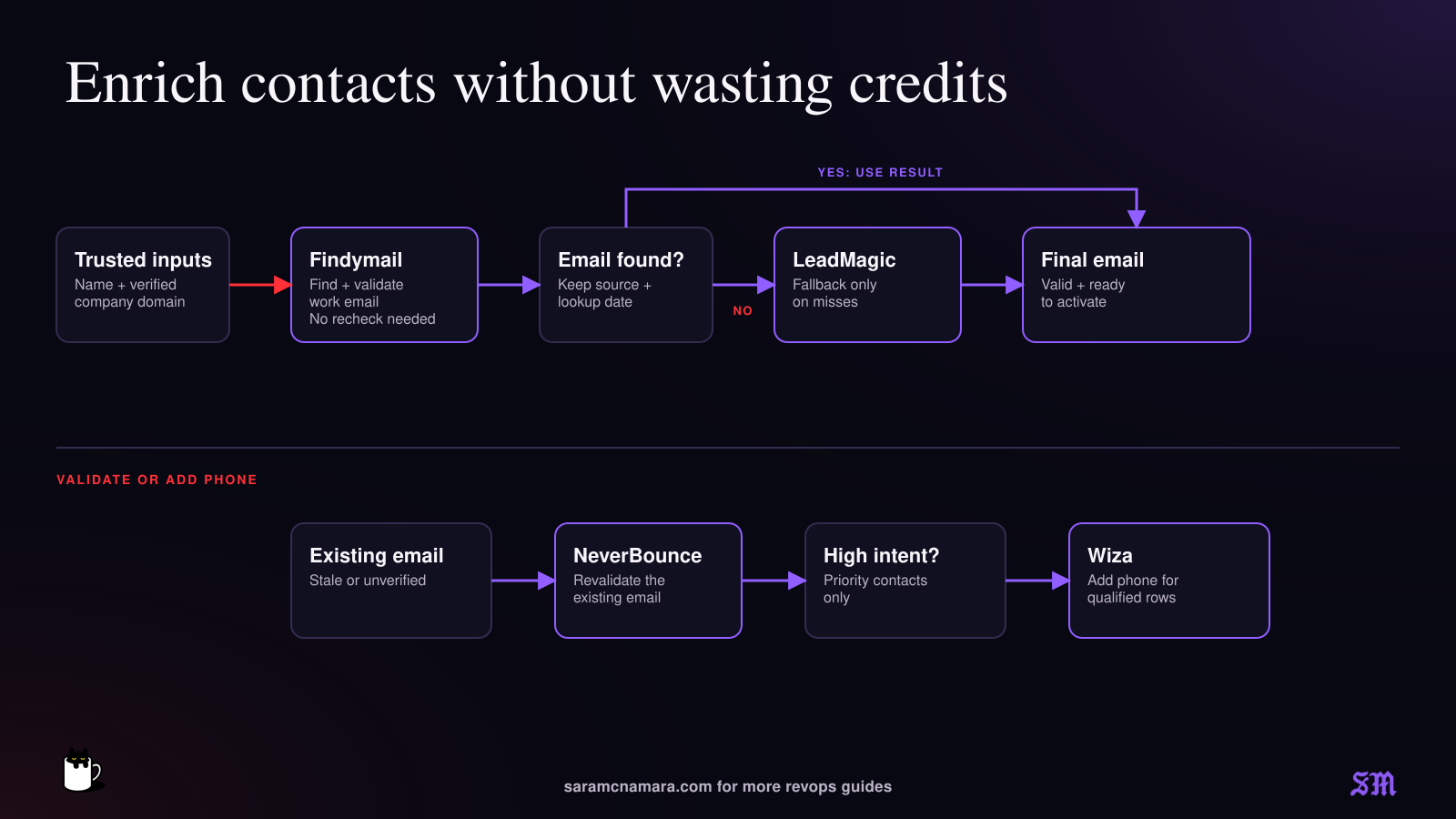
Campaign-ready work emails | Findymail → LeadMagic only on misses → NeverBounce only where a final recheck is needed | Coverage improves without paying every provider on every row |
High-intent inbound follow-up | Verified company and role → Wiza on priority rows → CRM routing | Phone spend follows intent instead of list size |
Paid-growth account segment | Adyntel → SpyFu → Claygent classification | Combines current ad activity and search context with a business-specific judgment |
Website-based personalization | Firecrawl → Claygent → human-reviewed campaign field | Clean source material reduces vague, generic output |
How to use this stack across Clay Audiences, CLI, and MCP
NOTE: these features are relatively new and evolving — the next sections are meant to be directionally helpful, not an exact how-to. Always check official Clay documentation for the latest!
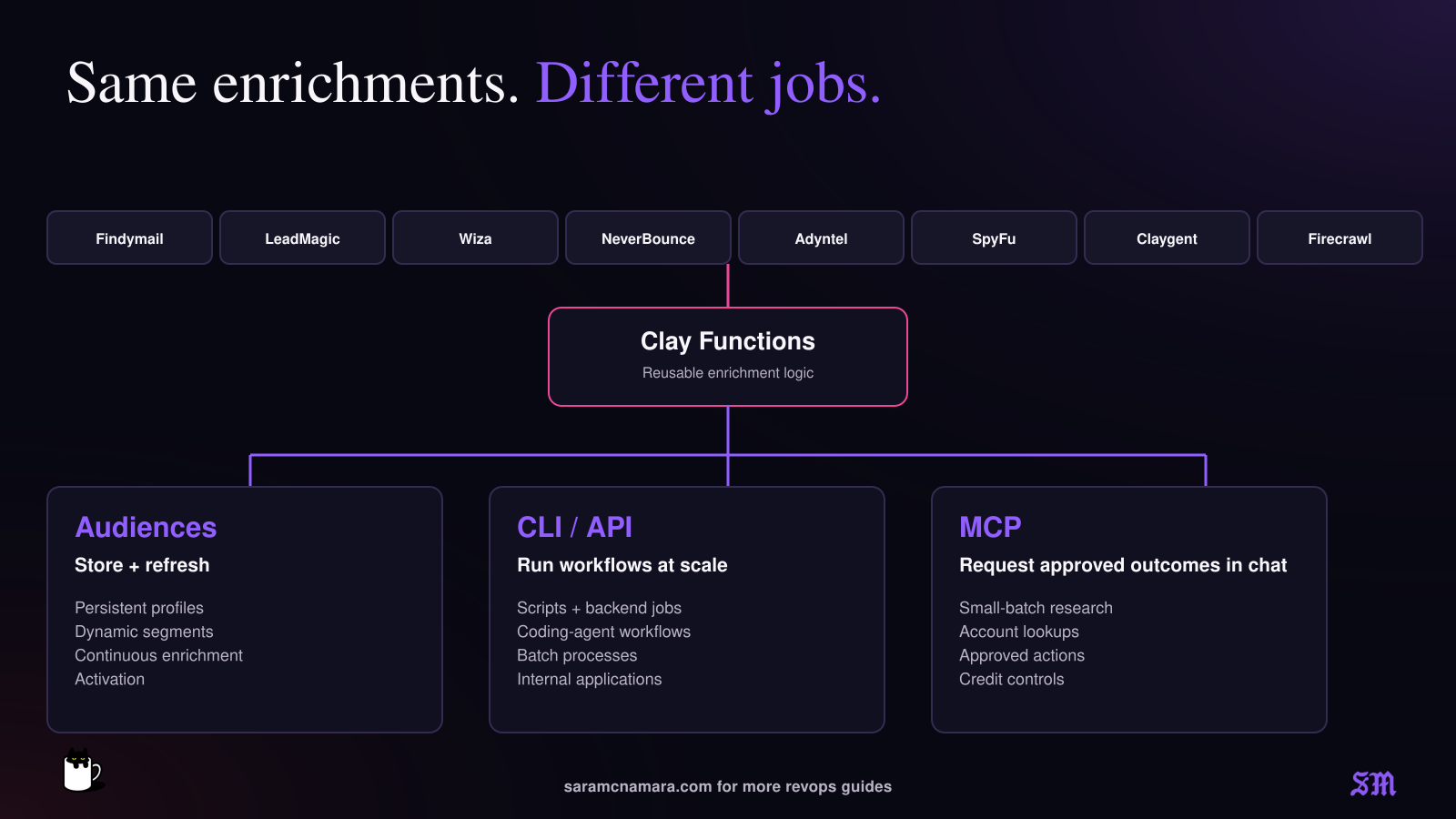
Clay is coming out with tons of really cool functionality that can be hard to keep up with. I would use Audiences to maintain the “the universe” of your CRM data and segments and CLI to run programmatic workflows. MCP is what lets people call approved workflows conversationally — great for marketers and AEs who want to just pull an email or phone number real quick.
Clay surface | Best for | Primary user | Use it when... |
Audiences | Persistent profiles, dynamic segments, continuous enrichment, and activation | Marketing Ops and RevOps, plus Demand Gen | The data should stay current and drive campaigns repeatedly |
CLI / API | Programmatic and headless workflows built to repeat | GTM engineers and developers, or technical Ops | The logic belongs in a script, backend process, or coding-agent workflow. Great for custom internal apps |
MCP | Conversational research and Ops-approved Functions | Reps and marketers, or account teams | Someone needs a small-batch answer without opening Clay and setting up a table |
Clay Audiences: keep the data and segment current
Audiences combines CRM or warehouse data with Clay enrichment in one persistent profile per person or company. Enrichment results are written back to the underlying profile, so the same field can be used across multiple dynamic audiences instead of being rebuilt in separate lists. Think of it as an identity layer.
Use the contact-data providers like this:
- Build a dynamic audience for marketable contacts with a work email that is missing or unusable.
- Run Findymail first, then conditionally run LeadMagic only on unresolved rows.
- Add Wiza only to a smaller high-intent or priority-account audience where phone follow-up is part of the agreed play.
- Map final email, email source, validation status, validation date, phone source, and phone lookup date into separate Audience fields.
Use the company and research providers like this:
- Enrich a company audience with Adyntel ad activity, then create dynamic segments by channel or current paid-ad activity.
- Add SpyFu search intelligence to identify companies with meaningful paid-search or organic visibility.
- Use Firecrawl to collect clean website material and Claygent or an Account Research Agent to classify the evidence against your own criteria.
- Create a segment such as
ICP fit = yes AND active ads = yes AND search activity above threshold, then sync membership to your CRM or ad platform.
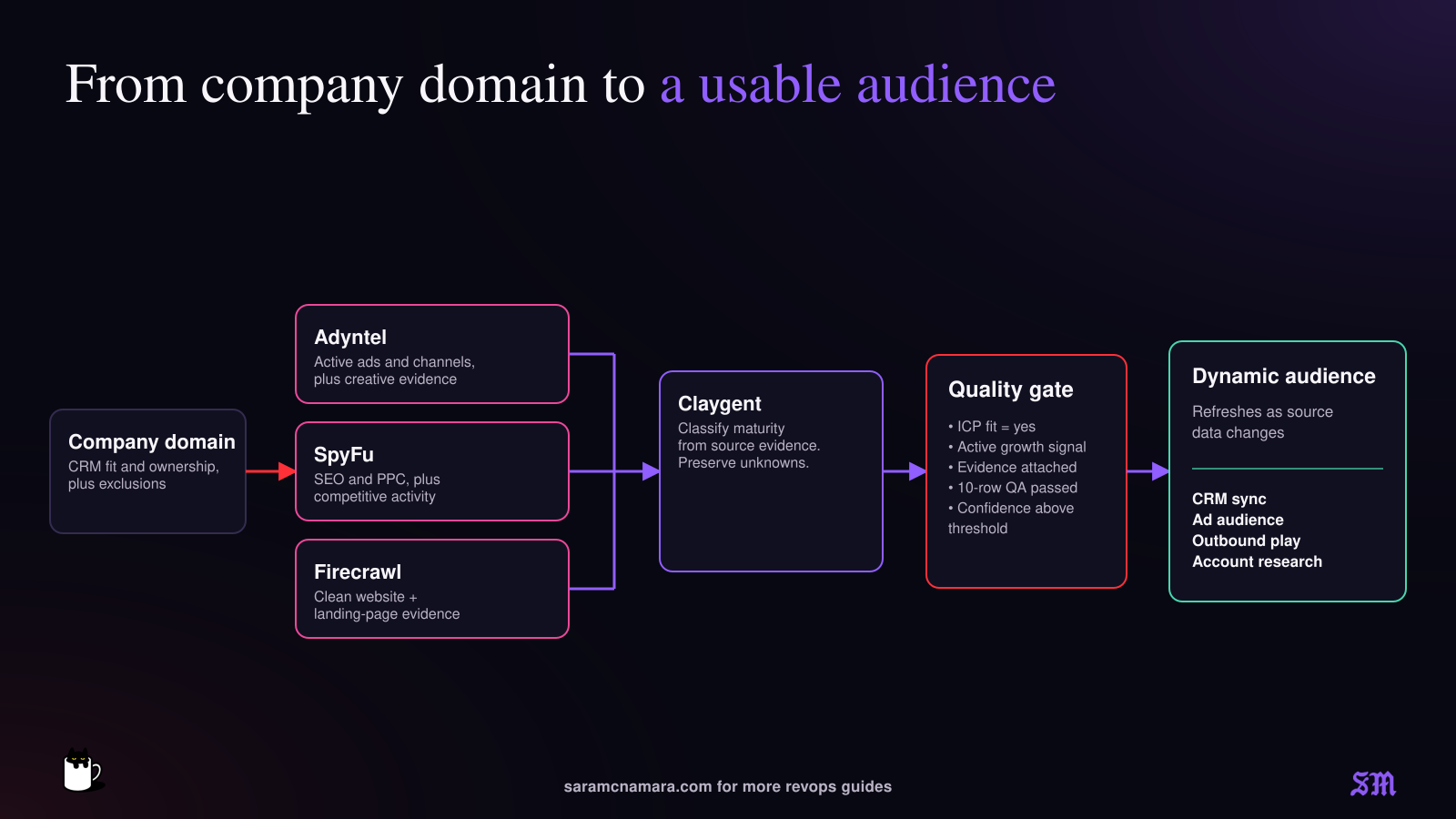
Example Audience: paid-growth accounts worth a campaign
- Import companies from your CRM, warehouse, CSV, or Clay's company search.
- Filter to your ICP before spending credits.
- Add Adyntel and SpyFu, plus the minimum website research required for the decision.
- Use Claygent to return a structured classification with evidence and an unknown state.
- Run on 10 records, review the output, set a credit budget, and only then enable continuous enrichment.
- Sync the qualified segment to your CRM or outbound workflow. Or send it straight to your ad platform.
HTTP caveat: This functionality is new and changing quickly: if your SpyFu or Firecrawl HTTP action is not available in the Audiences bulk-enrichment builder, run it in a Clay table and use Upsert Audiences Record to merge the result into the persistent profile. Lookup Audiences Record pulls the stored fields back into a table when a downstream workflow needs them.
My Audiences guardrails: Filter before enriching, test on 10 rows, use quality gates, and keep CRM export rules on
Never write until the field mapping and data quality have been reviewed.Clay CLI: turn the provider logic into repeatable infrastructure
Clay's CLI and Public API are for programmatic access without relying on the Clay UI. They can run searches and call enrichment Functions. They can also build Workflows. Workflows are still in Alpha, so I would use stable, tested Functions for production logic unless you’re open to experimentation/the automation is not load-bearing.
The highest-value CLI move is to package the provider combinations into named workflows with clean inputs and outputs:
Function or workflow | Providers behind it | Suggested output |
Marketing Contact Enrichment | Findymail → LeadMagic fallback → NeverBounce when needed | Final work email, source, validation status, validation date |
High-Intent Contact Prep | Wiza after an eligibility check | Phone number, source, status, lookup date |
Paid-Growth Account Check | Adyntel + SpyFu via HTTP + Firecrawl via HTTP + Claygent | Ad activity, search maturity, summary, evidence URLs, confidence |
A developer or coding agent can then call the same approved workflow from a script or batch process, or from an internal application. That is useful for jobs like enriching new event registrations from a backend queue or scoring a nightly account file. It also works for adding a paid-growth signal to an internal marketing tool.
Important limitations: The CLI builds logic through Workflows, not Clay tables. API and CLI calls consume the same Clay actions and credits as equivalent in-product work, and developer-platform credit budgets are not yet available in the current open beta.
Clay MCP: let marketers and reps call the approved workflows in chat
Clay MCP brings Clay search, enrichment, Audiences context, and enabled Functions into tools like ChatGPT and Claude. Codex works too. It is best for ad-hoc research and small batches. If someone keeps typing the same request or needs to process a large audience, package the logic as a Function and run it through Audiences or a programmatic workflow. I use this functionality almost daily and love it.
The raw provider choices should usually stay behind an Ops-built Function. The marketer asks for the outcome, while the Function decides whether to use Findymail, LeadMagic, Wiza, Adyntel, or another approved step.
Example prompts:
Run Marketing Contact Enrichment for these event leads and return only contacts with a valid work email.
Check whether acme.com is actively investing in paid growth and return the supporting ad and search evidence, along with website evidence.
For the accounts I own in the paid-growth Audience, find the best marketing leader and enrich a verified way to reach them.
Prepare a short account brief using our paid-media and website-research Function. Preserve unknowns instead of guessing.
Ops can control which Functions are enabled for MCP and set default or per-user credit limits. They can also monitor usage. Where Audiences access is enabled, reps can reason across first-party account data while admins can restrict access to appropriate records. Audiences controls through MCP are currently tied to Clay's Enterprise Audiences beta, so verify plan availability.
The clean architecture: Audiences stores the durable profile and segment membership. Functions hold the enrichment logic. CLI runs that logic programmatically. MCP lets people request the approved outcome conversationally.
Before you run anything at scale
Define the exact marketing decision each output will drive.
Keep source, lookup date, raw status, and normalized status in separate fields.
Add conditional runs so expensive fallbacks only run on unresolved rows.
⭐ Test a representative sample, including messy records and true unknowns.
Decide which results can activate automatically and which need human review.
Preserve consent and suppression fields through every step, plus anything tied to regional policy.
Measure usable coverage and downstream performance, not rows enriched.
My favorite enrichment stack is rarely one provider. The useful part is the logic between them: run the right source for the right question and keep the evidence. Then stop enriching once you have enough information to make the marketing decision.
A simple build worksheet
Decision | Your answer |
What marketing decision will this data change? | |
What trusted inputs do we already have? | |
Which provider runs first? | |
What condition triggers a fallback? | |
What counts as valid versus invalid, and what falls into unknown? | |
Which records can activate automatically? | |
Which results require human review? | |
How will we measure usable coverage and performance? |
Have feedback? You can reach me at sara@saramcnamara.com!
Related Guides
🌐 The Ultimate Guide to Forms & Landing Pages That Perform
A guide to high-performing forms and landing pages for GTM and Marketing Ops teams to improve conversion, stay compliant, and scale cleanly.
📋 Paid Media Master Playbook
A paid media playbook for GTM and Marketing Ops teams with practical strategies for planning, optimization, tracking, ROI improvement, and scale.

The Marketing Operations Strategist Newsletter
Join 3,500+ operations professionals. Get actionable MOPs tips every month.