Resource
☄️ What's new in Claude for RevOps and Marketing Ops: the 2027 guide
11/18/2026
A 2027 update to my Claude for ops guides. It covers what shipped since July, the pieces I'd test first and how I'd roll them out in RevOps and Marketing Ops….without adding to the GTM chaos.
Start here
Claude is getting good at doing the grunt work of GTM ops. It builds dashboards, digs through CRM data, answers seller questions in Slack and now sits in on your calls. Hand that to everyone without shared definitions, permissions, and an owner, though, and you get a huge mess. 🫠
I think 2027 is the year ops becomes the architect of how AI works across GTM.
Why ops should own GTM AI
Anyone can build an AI workflow now. The hard part is the logic across systems: what counts as a qualified lead, which field is the source of truth, who approves a change and how you know the output is right. That's ops work, and it always has been.
Owning GTM AI means ops owns four things:
- The business logic: the rules every workflow follows, like routing, scoring and handoffs
- The definitions: what every stage, source and metric means, written down ONCE 😤
- The evaluation: how we test that the output is right before anyone acts on it
- The approval path: what can write back to a system of record, and who signs off
Other teams can build plenty on top of that. Ops makes sure it all runs on the same rules.
The model I'd recommend is simple. Give GTM read-only access to the CRM and support tools so people can experiment, and route anything that writes back to a system of record through a quick ops check (or an approved, admin-controlled tool like Sybill). Then give people a shared place to show what they built, so the best experiments get scaled instead of reinvented. That puts ops in charge of the AI motion instead of being the team that says no...or the team too busy building reports to see what everyone else built.
The next step is a shared GTM brain: skills and context that ops architects once, so every team isn't building its own one-off version in a doc somewhere.
A lot has shipped for ops people since July. Cowork folded into one Claude and Projects got rebuilt. Claude also makes docs, decks, sheets, dashboards and whiteboards you can share now. Duet, an assistant that messages you first, is out in research preview, and Claude Meetings, which joins your calls, went into beta on Nov 12.
This guide covers only what's new, and how I'd use each piece in ops to free up my time and move faster. If you're new to Claude, start with the basics in Volume 1, the recurring jobs in Volume 2 and the audit in the ops brain guide. Everything here builds on those.
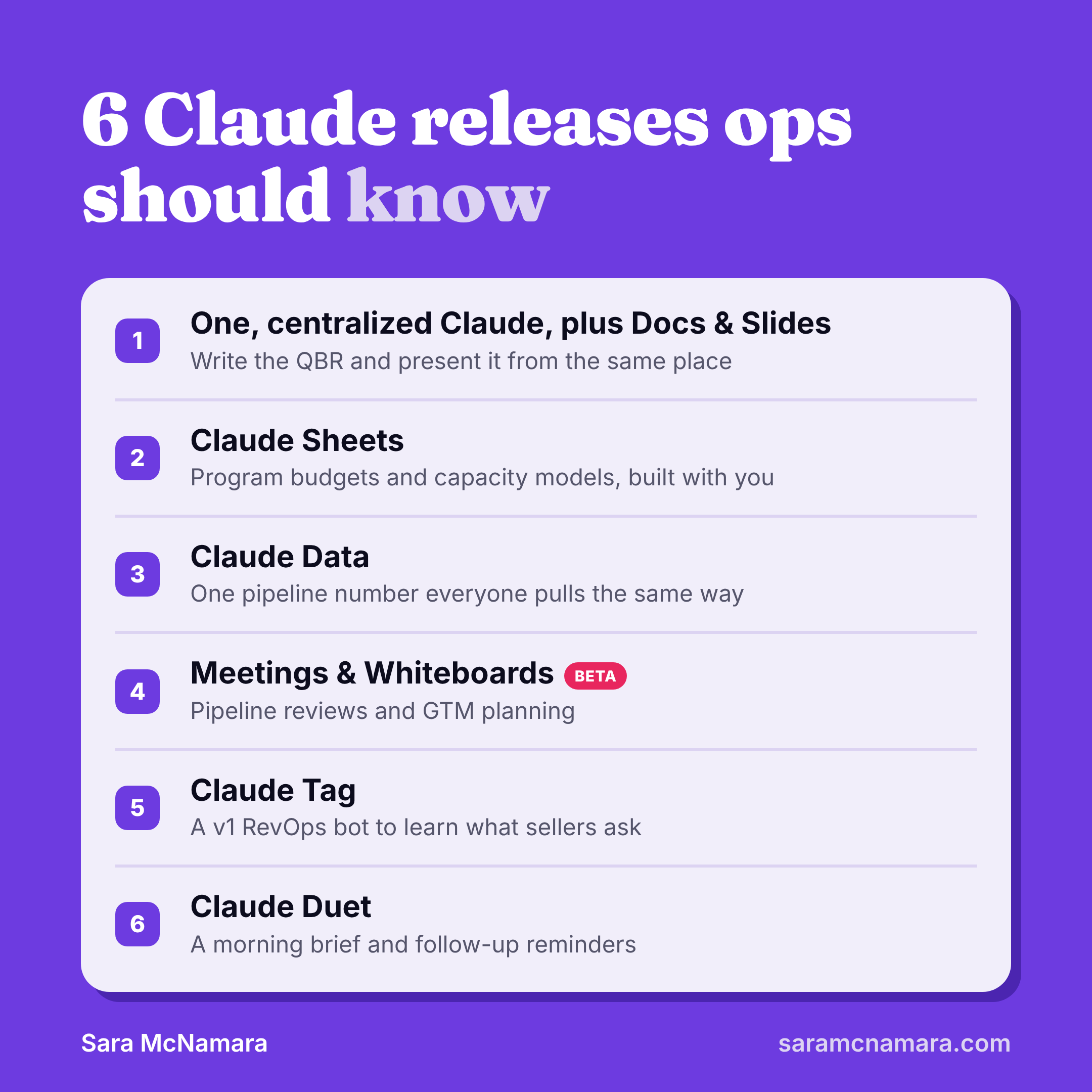
Most of these features are in beta or research preview, and availability depends on your plan. Check Anthropic's docs before you build on any of them, and loop in InfoSec before customer data goes near them.
What's new
At a glance
Check the "who can use it" column first...a few of the best ones are Team and Enterprise only, and Duet is only Pro and personal plans. The verdict column is my own call, so weigh it against your situation.
Date | Release | Who can use it | How I'd use it in ops | My verdict |
Nov 12, 2026 | Claude Meetings (beta) | Team and Enterprise, Google Meet only for now | Pipeline reviews and campaign kickoffs | Pilot on an internal meeting first — if it works well, really powerful for updating documentation, follow-up summaries, project tracking |
Nov 10, 2026 | Claude Sheets (beta) | Paid plans | Program budgets and capacity models | Good for first drafts; check the math |
Nov 10, 2026 | Claude Whiteboards (beta) | Paid plans | GTM and campaign planning sessions | Nice to have, not a priority |
Nov 10, 2026 | Claude Data, formerly Dashboards (generally available) | Pro, Max, Ultra, Team and Enterprise; certified queries are a Team and Enterprise beta | Dashboards built from approved, reusable queries, including marketing-sourced pipeline | Pilot it for governed reporting |
Oct 21, 2026 | Claude Duet (research preview) | Pro, Max and Ultra, starting in the US; not on Team or Enterprise yet | Morning brief and follow-ups | Test it on your own work now; plan for it once it reaches Team and Enterprise |
Sep 17, 2026 | Projects redesign: a coordinator plus parallel threads (beta, in Claude Code only for now) | Select Pro and Max users | Running a multi-part audit in parallel | Wait unless you already live in Claude Code |
Sep 16, 2026 | One, centralized Claude (chat and Cowork merged), plus Docs and Slides (out of beta since Oct 8) | Every plan, including Free; Docs and Slides are still beta on Enterprise | Writing the QBR and presenting it from the same place | Use it now |
Jul 2026 | Team and Enterprise (beta), billed on usage | A v1 RevOps bot in Slack, to learn what people ask | Use it as a v1 and collect data before you build |
Official sources: one Claude, Docs and Slides, Projects, Duet, Sheets, Whiteboards and Data, Meetings, Claude Tag.
Worth it vs. overhyped
Ok, that’s a lot. Where should you start? What’s worthwhile?
Worth adopting now
- Claude Data with certified queries. It's the release that fixes a problem ops already deals with day to day: five people pulling five different pipeline numbers. Lock the definition once, and every dashboard built on that certified query uses it. Plus it lives where more people want to work nowadays (instead of the CRM), Claude.
- One, centralized Claude, plus Docs and Slides. Not flashy, but it removes the copy-paste step between the analysis and the QBR deck, and that step eats hours every quarter. I also love the ability to set up things like slide design skills, so I can spin up an on-brand deck super quickly.
Maybe, as a v1
- Claude Tag as your RevOps bot. It's great at showing you what people ask. It's not built for the deterministic rules a RevOps bot needs, like how exactly to present answers and in what order. Use it as a v1 to see what people ask, then build the deterministic layer.
- Projects for ops audits. The coordinator is impressive, but today it's a Claude Code beta built around engineering goals. Most ops teams can't point it at their CRM yet.
Wait and see
- Meetings. Worth a pilot on an internal meeting. This one is definitely on my radar, just need to get access. 🤞
- Duet. Personal use now, work later, once it reaches Team and Enterprise. I’d put this in “worth adopting now” if it was available for B2B companies though — I’m finding it super useful personally and I think Sales, Marketing, CS will take to it very quickly.
Which model to use
Anthropic's own guide to choosing a model says most workloads should start with Claude Opus 5.5, and that tuning effort is often a better lever than switching models. Four models matter for ops right now:
Model | What Anthropic says it's for | How I'd use it in ops |
Claude Fable 5.2 (Nov 9) | The highest available capability, like agent sessions that run for hours or multistep deep research | A full instance audit or a big job-market analysis, only when Opus falls short |
Claude Opus 5.5 (Sep 22) | Complex agentic and enterprise work, and the default starting point | Roadmap docs, scoring model design, multi-thread Projects |
Claude Sonnet 5.5 (Sep 28) | Speed and capability for everyday work | Meeting prep, daily briefs and most scheduled jobs |
Claude Haiku 5.5 (Oct 7) | The lowest latency and price, for high-volume processing | Tagging records, normalizing list values, quick rewrites |
My rule: start new work on Opus 5.5, move anything that runs on a schedule to Sonnet 5.5 once it works, and turn effort up before you reach for Fable. ALSO: be sure to check which model you’re using each time you open a new chat. Claude loves to hang on to your last selection, so it’s easy to accidentally auto-select Fable again and burn through advanced tokens on an easy query.
Sources: Choosing the right model and the models overview in Anthropic's docs. Release dates come from Anthropic's launch pages for Opus 5.5, Sonnet 5.5, Haiku 5.5 and Fable 5.2.
One Claude and the new Projects
In Volume 1 I had a whole table on when to use chat versus Cowork. You can skip that decision now. 😍 Chat and Cowork are one Claude, and an ordinary request turns into a multi-step task when it needs to.
Projects changed more than anything else. The redesigned Projects have a coordinator that splits the work into threads, and the threads run in parallel. For now it's a beta inside Claude Code for select Pro and Max users, built around engineering goals. Anthropic says the rollout will expand to chat and Cowork. However — it does seem reminiscent of what I’m seeing in Duet, which gives us a hint that this coordinator will probably show up there once its more broadly available.
Where I'd use it in ops once it reaches regular Claude: the six-layer audit from the ops brain guide. Give the coordinator the brief and let separate threads take inventory, collisions, data health and definition drift at the same time, then roll the findings up into one verdict table. On the marketing side, the same setup could check lifecycle stages, UTM tracking, campaign members and lead routing in parallel. I’m pretty stoked to use it for any kind of audits.
Two cautions. Parallel threads use more of your usage limits, so start with one object, not the whole instance. And keep the read-only rule from the ops brain guide...more threads means more places for an instruction to drift.
Docs, Sheets, Slides and Data
Claude's output used to stop at the chat window, and then you copy-pasted it into another tool. It was…annoying.
With these four, you edit and share it without leaving Claude. When you need it elsewhere, Docs and Slides export with 1 click too: docs to Word or Google Docs and slides to PowerPoint or PDF. I’ve been using the Slides functionality heavily, to spin up decks for meetings like Revenue Review.
Artifact | How I'd use it in ops |
Docs | SOPs and field dictionaries, edited with Claude and your team in one place |
Slides | The monthly pipeline readout or QBR, built from the same analysis instead of rebuilt by hand |
Sheets | Program budgets and capacity models you can hand to Finance |
Data | RevOps dashboards built on certified definitions, so everyone pulls "pipeline" the same way |
Data is the one I'm most excited about. It connects to your CRM and data warehouse, and its certified queries (a Team and Enterprise beta) let you lock in what a metric means before anyone builds a dashboard on it. Forecast meetings tend to stall on someone asking "where did this number come from?" One agreed definition answers that before anyone asks. 👀 The catch: certified queries only help when people build on them. Claude can reuse them, but nothing stops someone from writing a fresh query, so look for the certified badge before a number goes into a deck.
For Marketing Ops, the first certified query I'd write is marketing-sourced pipeline, defined clearly with our official definition (same one used across marketing, sales, finance etc).™️
On Team and Enterprise plans, public sharing is off until an owner turns on external sharing. Good default for anything with pipeline numbers in it.
Overall, it’s a great development because we have so many stakeholders who don’t want to open a dashboard in Salesforce or HubSpot anymore. But then Claude would notoriously drift in terms of data definitions. So now we can exert a little more control to make sure our stakeholders get trusted metrics back.
Claude Meetings and Whiteboards
Claude Meetings went into beta on Nov 12. Claude joins your call and can update your team's documents while people are still talking. Launch coverage says it starts in beta on Team and Enterprise plans with Google Meet, and that Claude identifies itself in the meeting with a chat notice.
Whiteboards is the other half. Teams talk a plan through on a shared board and Claude summarizes the findings. From there an idea can move into a sheet, and then into a dashboard.
Ops meetings I'd try it on first:
- The weekly pipeline review: Claude pulls a deal's history the second someone asks "what happened with this one?"
- The campaign kickoff: the brief, the UTM plan and the list pull requests drafted before the call ends
- GTM planning: the launch plan lands on a whiteboard with owners and dates while the team argues about them
- Stakeholder intake: requests captured live and turned into tickets, so nothing lives only in someone's memory of the call
Before you turn it on, decide which meetings qualify and what Claude can pull from your connected apps during a call. Then name who owns finishing the work it starts.
By the way, you don’t have to use Whiteboards in meetings — it’s kind of like Miro, where you can design a board at any time. I’m already using it frequently to prep visuals for meetings, especially when we’re talking about projects or processes (which don’t work as well in slide or doc form).
Oh, and using the dropper to make edits is borderline addictive. 😍 💧
Claude Tag in Slack
Claude Tag brings Claude into your Slack channels as a shared teammate. Tag @Claude in a channel and everyone can interact with it and ask questions. It's in beta on Team and Enterprise plans, and it replaced the older Claude in Slack app on August 3, 2026.
This is where I'd test a RevOps bot, as a v1. I wouldn't build the final version on Tag, because a RevOps bot needs deterministic rules (who owns this lead, which field wins) and those are hard to enforce in a shared Claude. What Tag does well is show you what people ask before you build something sturdier. Sellers and marketers already ask their ops questions in Slack ("why is this lead assigned to me?" "which UTM do I use for this webinar?"), so put the answers where the questions already happen. Back it with your ops brain docs and a read-only CRM connection.
My 2027 plan aims for about a third of those basic questions answered without a human. That's a directional target until I have a baseline…I’ll let you know how it pans out. 😅
Treat the v1 as data collection. Log every question it gets, which answers were right and which ones needed a hard rule instead of a judgment call. That log becomes the spec for the version you build next.
Tagging Claude in a channel bills to your organization, while direct messages count against your own account, and admins can set spend limits per channel. Set one before you launch...a busy channel full of "quick questions" adds up. 🤑
Claude Duet: first look
Claude Duet messages you first. It's a research preview you message the way you'd message a person, and it uses the same memory and connectors as regular Claude. I got early access, and my notes are below.
A few things to know before you plan around it:
- It checks your connected accounts every few hours, not constantly
- Before it sends a message, makes a payment, signs a document or deletes anything, it shows you the action and waits for your approval
- It shares your plan's usage limits with the rest of Claude, and its scheduled email/Slack checks count toward them
- It's included in Pro, Max and Ultra, starting with US subscribers, and it's not on Team or Enterprise plans yet
That last one matters for ops. If your company is on Team or Enterprise, Duet is a personal-plan tool for now, so keep company data out of it until your org can turn it on properly.
My take: I run Duet and a Grok bot for my personal stuff right now. Neither is an option at work yet...we don't have a Grok bot there. Duet is the one I'm waiting on, because so many companies already have Claude approved, and getting another AI tool through security review is its own project. Once Duet reaches Team and Enterprise, that's where my day-to-day ops tasks and reminders go. 👀
Oh, and also…like everything else, token usage is king. I often ask my Duet to consolidate queries and tasks, so I can save token usage…do the same thing with Duet, Grok Bot, any of these AI tools! No one loves running out of usage or having a surprise bill.
🎁 Steal this: a lifecycle routing audit
If you try one thing from this guide, make it this. It runs in regular Claude today, and you can check the output by hand.
- Input: a 90-day export of lead history (owner and lifecycle stage changes, with timestamps), your routing rules doc, your lifecycle stage definitions and 20 records you already know went wrong.
- Claude's part: find the records that broke a routing rule and group them by likely cause, with the record ID behind every finding.
- Your part: confirm a sample of the failures and mark the exceptions Claude can't know about, like a named account you route by hand on purpose.
- Output: one table with each likely cause, how many records it hit, a recommended fix and an owner.
Prompt
What the output looks like
Illustrative, not from a real run.
Likely cause | Records | Example IDs | Confidence | Recommended fix | Owner |
Lead source blank, so the fallback rule fired | 38 | L-1042, L-1187, L-1203, L-1311, L-1420 | High | Require lead source on every form | Marketing Ops |
Manual reassignment after routing | 21 | L-0988, L-1056, L-1144, L-1290, L-1377 | Low | Ask sales managers before changing anything | Sales leadership |
Round robin kept assigning reps who were out | 12 | L-1019, L-1098, L-1162, L-1255, L-1402 | Medium | Sync out-of-office status to the queue | RevOps |
Lifecycle stage jumped from Lead straight to SQL | 9 | L-1031, L-1129, L-1218, L-1336, L-1448 | Medium | Block stage skips in the workflow | Marketing Ops |
Spot-check five findings by hand before you trust the rest. If the groups look off, rewrite your rules doc before you rewrite the prompt. 😅
My 2027 roadmap
Where each one lands
Here’s a view into the brainstorming I’m doing for my 2027 GTM ops/RevOps plan. I hope it is helpful as you plan and think through the best opportunities you have for your team:
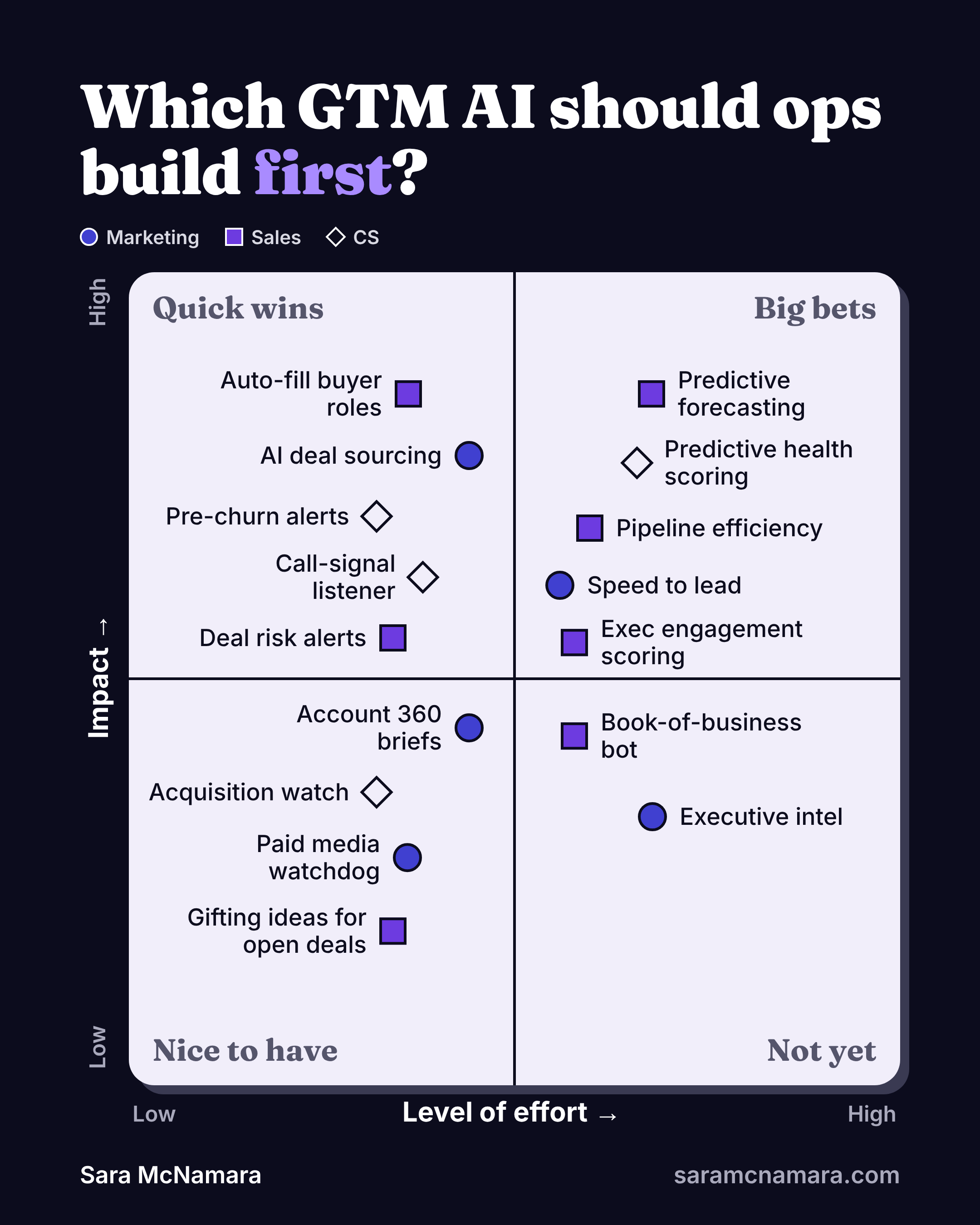
2027 use case | What I'd build it on | Status |
RevOps bot | Claude Tag as a v1 to collect questions, then a build with deterministic rules (I have it in Claude Code) | First internal build |
Buyer roles auto-fill | Connectors to the CRM and call recorder — or Sybill | First stakeholder pilot |
Recurring meeting prep | A scheduled task now, Meetings once it reaches our plan — or Sybill | Candidate |
CRM monitoring | Project threads on a schedule, posting to Slack | Candidate |
Pre-churn alerts | A scheduled task feeding a Data dashboard for CS — or Sybill + Pylon | Candidate |
Deal risk alerts | A Data dashboard, reviewed live in the forecast call — or Sybill | Candidate |
AI deal sourcing | A Skill built on written source definitions | Candidate |
Capacity and hiring model | Sheets | Candidate |
By the way, I am not sponsored by Sybill — we just use it as a call recorder and it has AI plugged in, so it’s helpful to use as a quick way to set up a v1. If we need to get more complex, we can always graduate to a custom solution once we’ve proven out the v1 value.
Build, buy, defer or drop
Ops owns the definitions and the test for what good looks like, and partners with IT and Engineering on infrastructure and security.
Call | The question I ask |
Build | Does the value live in our own definitions or product data? Can we create something so bespoke that it drives massive business value that a purchased solution could not? |
Buy | Does a tool we already pay for capture the signal? |
Defer | Is the problem frequent and expensive enough to maintain another automation? |
Drop | Would anyone notice if this never shipped? |
What I've learned so far
- Upkeep is harder than the first build. Keeping each skill and bot current has been my biggest challenge. A skill that was right in March can be wrong by November, so every build needs an owner and a review date. No “set it and forget it” here. 🙃
- Read-only access is what makes experimenting safe. When everyone can look but nothing writes back without a RevOps check, people try more things and nobody breaks the CRM by accident. Read-only doesn't control who can see what, though, so pair it with role-based permissions and clear rules on which data can go into which tool.
- Scattered AI is the default. Left alone, every team builds its own one-off version in its own doc. That's why a shared GTM brain matters.
- AI does the grunt work, and people own the outcome The best places to start are campaign ops, enablement and reporting. AI does the prep, and a person checks it for accuracy and explains what it means.
- Exact rules belong in your systems. Lead ownership and routing should run the same way every time, so they live in the CRM. Think of AI as more loosey-goosey, where you might need to write deterministic code or have a deterministic solution where things need to be rigid.
What does this mean for the future of ops?
Claude can answer questions in Slack now, and it'll be sitting in your meetings soon. It still can't settle the argument between Sales and Marketing about what counts as a qualified lead, or tell when a number is going to look wrong to your CFO.
That part stays with us, which is why I think ops should own GTM AI in 2027.
P.S. This is a living guide, and half of these features are still in beta. I'll update it or publish a new guide as they ship. If you've found another use for one that’s super cool, reply to the newsletter and I'll add it here, with credit. 🫡
More in this series
Sources
- Anthropic: Claude Cowork and chat are now one Claude
- Anthropic: Projects, redesigned
- Anthropic: Introducing Claude Duet
- Anthropic: Introducing Claude Meetings
- Anthropic Help Center: Get started with Claude Data
- Anthropic Help Center: What is Claude Tag?
- Anthropic: Artifacts
- BetaNews: Claude Meetings, Whiteboards and Sheets
- TechBytes: Claude Duet availability
Related Guides
🎯 The Ultimate Guide to Lead & Account Scoring
A lead and account scoring guide for GTM teams with templates and design patterns that improve prioritization and pipeline outcomes.
🧠 The Claude Ops Brain for your MAP or CRM
Everyone’s building a marketing brain or a sales brain, and every one of them reads from your CRM. This guide shows you how to build the ops brain they depend on, with copy-paste prompts for all six layers.

The Marketing Operations Strategist Newsletter
Join 3,500+ operations professionals. Get actionable MOPs tips every month.